


KEY EXPERIENCE

The sys admin's daily grind: Single-packet authentication
ByConventional, woodpecker-style port knocking is open to sniffing and brute force knocking attacks. Sending an encrypted packet with an access request to the server is safer and more modern. Learn more about Firewall Knock Operator, a.k.a. Fwknop.
Conventional port knocking, which I described last month, protects you against attackers who routinely scan whole networks looking for "low-hanging fruit." A cracker who takes more time and logs communications can also identify knocking signals because the sequences will repeat.
In theory, you might consider using lists of one-off knocking signals that become obsolete after use. Unfortunately, this is really complex. Besides, if the administrator is not creative enough, an attacker could just try out popular knocking sequences (port 7000, 8000, 9000, ?) to gain access.
Single-Packet Authentication (SPA) is one possible solution. The knocking system sends a single packet containing the encrypted authentication credentials – typically a pass phrase – and the client request to open a specific port. An SPA implementation that works really well is Firewall Knock Operator, or Fwknop [2]. Besides the normal build tools, the installation requires Perl, the libpcap-dev package, and the CPAN Net::Pcap module. After installing all of these resources, installing Fwknop is a breeze thanks to the Perl-based installer.
Matching Knobs
Fwknop comprises the fwknopd server and the fwknop client. By editing two files below /etc/fwknop/, you can configure the server; fwknop.conf contains the basic configuration. Initially, you will just need to change a couple of parameters, which are tagged __CHANGEME__.
The other knobs you could tweak here have very sensible defaults. Note that you need to synchronize the time between the server and the client because if the difference is too big, fwknopd will ignore the knocking client.
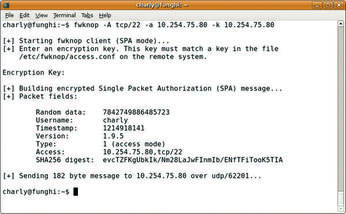
The entries in /etc/fwknop/access.conf define how fwknopd responds to a client knocking. The secret key that the client uses to identify itself is stored here. The SOURCE line can be used to restrict the networks from which the daemon accepts knocking. To set the port that the system opens on successful knocking – for example, tcp/22 for SSH – you can use OPEN_PORTS. Figure 1 shows a successful attempt. The fwknop client picks up the key from its own /etc/fwknop/access.conf.
If the SSH connection doesn't open quickly enough, the FW_ACCESS_TIMEOUT on the server triggers. This time is normally set to 30 seconds, but I went for twice that – never rush an admin on the job!
INFO
[1] "Knock-Knock" by Charly Kühnast, Linux Magazine, September 2008,
[2] Fwknop: http://www.cipherdyne.org/fwknop
Charly Kühnast is a Unix operating system administrator at the Data Center in Moers, Germany. His tasks include firewall and DMZ security and availability. He divides his leisure time into hot, wet, and eastern sectors, where he enjoys cooking, fresh water aquariums, and learning Japanese, respectively.
Subscribe to our Linux Newsletters
Find Linux and Open Source Jobs
Subscribe to our ADMIN Newsletters
Support Our Work
Linux Magazine content is made possible with support from readers like you. Please consider contributing when you’ve found an article to be beneficial.

News
-
TUXEDO Computers Unveils Linux Laptop Featuring AMD Ryzen CPU
This latest release is the first laptop to include the new CPU from Ryzen and Linux preinstalled.
-
XZ Gets the All-Clear
The back door xz vulnerability has been officially reverted for Fedora 40 and versions 38 and 39 were never affected.
-
Canonical Collaborates with Qualcomm on New Venture
This new joint effort is geared toward bringing Ubuntu and Ubuntu Core to Qualcomm-powered devices.
-
Kodi 21.0 Open-Source Entertainment Hub Released
After a year of development, the award-winning Kodi cross-platform, media center software is now available with many new additions and improvements.
-
Linux Usage Increases in Two Key Areas
If market share is your thing, you'll be happy to know that Linux is on the rise in two areas that, if they keep climbing, could have serious meaning for Linux's future.
-
Vulnerability Discovered in xz Libraries
An urgent alert for Fedora 40 has been posted and users should pay attention.
-
Canonical Bumps LTS Support to 12 years
If you're worried that your Ubuntu LTS release won't be supported long enough to last, Canonical has a surprise for you in the form of 12 years of security coverage.
-
Fedora 40 Beta Released Soon
With the official release of Fedora 40 coming in April, it's almost time to download the beta and see what's new.
-
New Pentesting Distribution to Compete with Kali Linux
SnoopGod is now available for your testing needs
-
Juno Computers Launches Another Linux Laptop
If you're looking for a powerhouse laptop that runs Ubuntu, the Juno Computers Neptune 17 v6 should be on your radar.