Analyzing Public Infrastructure with Shodan
What Can I Do?
You can use Shodan for a variety of tasks, including:
- Reconnaissance – Security/cyber security engineers use Shodan to perform information gathering during pen testing or FlawScouting.
- Vulnerability discovery – Security analysts use CVEDB, one of Shodan's products, to gain insight into vulnerabilities
- Awareness – Because Shodan is noted for displaying devices connected to the Internet, security engineers rely on it to check if private services are accessible via the Internet due to misconfiguration.
Note that Shodan is not a tool for exploiting vulnerable devices. It just allows users to search for devices accessible via the Internet.
Using Shodan
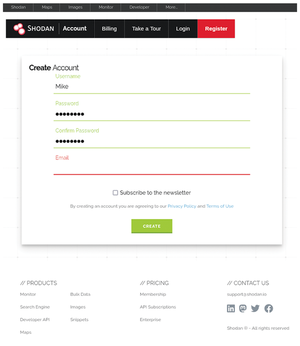
Before you use the Shodan search engine and other Shodan products, you need to create an account. Visit the Shodan registration page [3] to get started. You'll see a form similar to Figure 6.
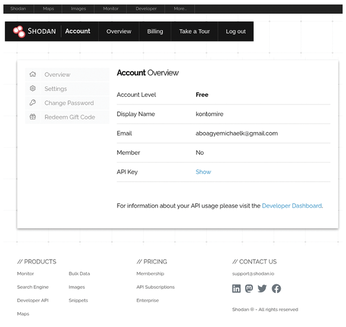
Once you have created an account, click on the API Key link to display your API key (Figure 7).
There are two APIs for accessing Shodan. The REST API provides methods to search for databases and web servers, look up hosts, summarize search results, and offers a variety of utilities for developers. The streaming API provides real-time feeds of data meant for large-scale consumption. Additionally, Shodan offers a catalog of libraries for programming languages such as Python and Java.
Analyzing CVEs with Shodan CVEDB
You can use the curl command to extract current CVE vulernability reports from Shodan. Note that Shodan retrieves approximately 1,000 rows of current CVEs at once with curl, which can be challenging to view or use. To extract the current vulnerabilities, use the following command:
curl https://cvedb.shodan.io/cves
The following command filters for vulnerabilities that are known to have been exploited in the wild:
curl https://cvedb.shodan.io/cves?is_key=true
To filter vulnerabilities by timestamp, use the following command:
curl https://cvedb.shodan.io/cves?start_date=2025-01-01&end_date=2024-01-01
Finally, to search for vulnerabilities by product, use the following:
curl https://cvedb.shodan.io/cves?product=postgres
Alternatively, you can use the requests library to search for a specific vulnerability. Open your Python interpreter with the following command:
python3
Then, execute the following command to check a specific vulnerability by its CVE ID:
import requests
CVE_ID = "CVE-2021-44228"
cve = requests.get(f"https://cvedb.shodan.io/cve/{CVE_ID}").json()
print(cve)
It is advisable to use a data analytic tool like Pandas [4] to analyze Shodan CVEDB results because Shodan enumerates many rows at once.
Shodan also provides a REST API for all their services. To search for all services associated with a specific host, use the following:
curl -X GET "https://api.shodan.io/shodan/host/8.8.8.8?key=GrcGnF06S3LcbsUWiAYnTy9kGLRgB6fJ"
Shodan also provides a command-line interface (CLI) tool to perform similar searches. Before you use the Shodan CLI tool, you need to install it. On Debian systems, create a virtualized environment using the command:
python -m venv venv
Then activate the virtual environment via the following:
source virtualenv/bin/activate
Finally, install Shodan CLI and initialize it with your API key:
pip install shodan
shodan init your_api_key
To search for services associated with a specific IP address using the Shodan CLI, you just need to enter the following:
shodan 1.1.1.1
where 1.1.1.1 is the IP address of the device you wish to study.
« Previous 1 2 3 Next »
Buy this article as PDF
(incl. VAT)