An Out-of-Date CMS is No Match for a Skilled Intruder
Installation
I will offer only a brief description of how to install CMS Made Simple, so I can skip to the more interesting stuff. To get started, I ran through the steps in Listing 1.
Listing 1
Installing CMS Made Simple
$ mkdir cms
$ cd cms
$ wget http://s3.amazonaws.com/  cmsms/downloads/14076/  cmsms-2.2.5-install.zip
$ apt install unzip -y
  Archive: cmsms-2.2.9-install.zip
  inflating: cmsms-2.2.9-install.php
  inflating: README-PHAR.TXT
$ chown www-data:www-data *
Figure 5 shows the introductory notes for CMS Made Simple, which are in the README-PHAR.TXT file. The help file goes on to explain that you'll need a "minimum version of PHP 5.4.0 with the Phar library enabled" to get the CMS running. To check whether the Phar library is present and available, run the command in Listing 2.
Listing 2
Checking for Phar
$ php -i | grep "phar"
Registered PHP Streams => https, ftps, compress.zlib, compress.bzip2, php, file, glob, data, http, ftp, phar, zip
Phar-based phar archives => enabled
Tar-based phar archives => enabled
ZIP-based phar archives => enabled
phar.cache_list => no value => no value
phar.readonly => On => On
phar.require_hash => On => On

After a tip I found online [7], I ran the following commands to open up the permissions for the Apache user (which is called www-data):
$ cd /var/www
$ chown www-data:www-data html/
$ chown -R www-data:www-data html/
$ chmod -R 0775 html/
$ apt install php-gd
$ apt install php-xml
$ apt install -y php-mbstring
After I entered the commands and clicked the following link, I saw the display shown in Figure 6:
http://127.0.0.1:8888/cmsms-2.2.9-install.php/index.php
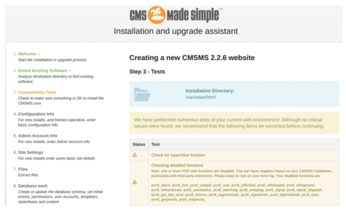
The next step is creating a database called cms. You can log into MySQL with the password you created during the set up:
$ mysql -h localhost -u <username>
Once logged in, create your database with this command:
mysql> CREATE database cms;
Query OK, 1 row affected (0.00 sec)
After you run through the steps in the wizard, you should be all set. Note that just visiting the root of the URL without the index.php part will not present the CMS page.
Figure 7 shows what success looks like. The CMS is ready to attack!

Exploit
The exploit (which appeared in 2019) affected the versions mentioned of the CMS, and knowledge about the attack rapidly went global. Users were scrambling to upgrade at the earliest opportunity. As a result, there are code snippets that will run the exploit all over the web [8].
To ensure that the version of the CMS that you just installed is indeed vulnerable, check the bottom-left corner of the CMS splash page. In my case, I can see that version 2.2.6 is installed as expected.
Install SearchSploit
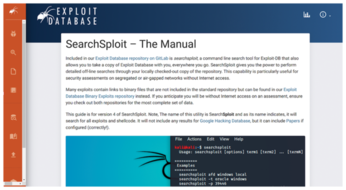
SearchSploit [9] (Figure 8) is a searchable command-line version of the MetaSploit pen-testing framework. In order to get SearchSploit running on the command line, start by cloning the GitHub repository using the following command:
$ git clone https://gitlab.com/exploit-database/exploitdb.git
To run SearchSploit from anywhere in the system, I usually create a Bash alias. Inside my aliases file, I add this line:
alias se='/path/exploitdb/searchsploit'
Alternatively, you could add the searchsploit file to your path or indeed create a symlink into a directory that is already in your user's PATH variable.
Every now and then, I will enter the exploitdb directory and run the following command to update Exploit Database content:
$ git pull
I should really add this to a cron job so that the update is done automatically. I'm sure you could find a more graceful way of keeping it up to date, but I haven't stumbled across it yet.
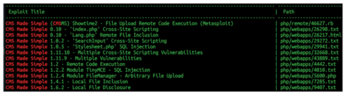
To prove that SearchSploit is working, I will search for CMS Made Simple without specific versions:
$ se CMS Made Simple
The results of the search appear in Figure 9.
« Previous 1 2 3 4 Next »
Buy this article as PDF
(incl. VAT)