Managing Systems and Applications with pyinfra
Using Secrets with pyinfra
An important concern when placing pyinfra files in a Git repository is the handling of secrets. As soon as you need to deploy files with password, keys, or other sensitive information, it's not recommended to store them directly in the files you put in the Git repository, even if it's a private repository. Unlike alternative configuration management tools with built-in secrets management or seamless integrations, at first sight, pyinfra lacks this functionality.
However, because pyinfra deploys are just Python programs, you can easily integrate an existing secrets management solution into your deploy code. For my own pyinfra repositories, I opted for Secrets OPerationS (SOPS) [9] and its Python wrapper SOPSy [10], along with age [11] for file encryption with my SSH key pair.
How does this work? First create a .sops.yaml file in your repository with a creation rule that uses age with your public SSH key:
---
creation_rules:
  - age: >-
    ssh-ed25519 AAAAC3NzaC1lZDI1NTE5...
Then edit a new file with sops:
sops edit secrets.yaml
This opens a new YAML file with some example keys and values. Edit this using keys as names for your secrets; values are the passwords and other sensitive data needed in your pyinfra code. For example, use
smtp_user: 060ef95df2fa4683aef6ca3ecf
smtp_password: c983deee174a4f6b9c97035a6d
If you look at the file after saving it (e.g., with cat or your regular editor), you see that the keys are still there, but the values are encrypted. SOPS has also added some extra keys with meta information, such as the SOPS version and the public key used to encrypt the file (Figure 3). This allows you to safely put this encrypted secrets.yaml file in your Git repository, as only you can decrypt it with the corresponding private key.
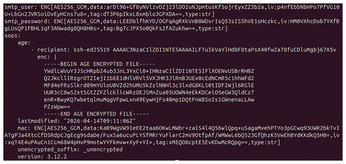
Just running
sops edit secrets.yaml
again shows you the original content in your editor, decrypted using your SSH key. After saving your changes, SOPS re-encrypts the file, and you can commit the changed file to your Git repository.
Although pyinfra has no native support for SOPS, using these secrets within pyinfra is remarkably simple. Just add the following four lines to a config.py file:
from pyinfra import config
from sopsy import Sops
sops = Sops("secrets.yaml")
config.secrets = sops.decrypt()
In your deploy code, in your inventory, or in any task where you need a secret, you can use these secrets. For instance, if you need to configure an SMTP user and password on all your hosts, just add this to your group_data/all.py file:
from pyinfra import config
smtp_user = config.secrets["smtp_user"]
smtp_password = config.secrets["smtp_password"]
When you now run your deploy, pyinfra loads its config.py file as the first step, prompts for your SSH key passphrase, decrypts the secrets file, and loads your secrets into the config.secrets object, allowing the rest of your code to use these secrets – all this without having to store unencrypted secrets in your Git repository.
Conclusion
Pyinfra is a flexible and fast tool for configuration management of any system with a POSIX shell and SSH access. If you already know Python, you don't need to learn another language. Moreover, integrating other Python packages is straightforward, as shown by how easy it is to add support for secrets in pyinfra. Alternative connectors are available beyond the default ssh connector, such as connectors for executing commands in Docker or Podman containers.
Pyinfra's documentation [12] is extensive, covering topics that I haven't talked about in this article, including writing your own operations, facts, and connectors. Personally, I've transitioned from Ansible to pyinfra for managing my infrastructure's configuration, and I'm constantly expanding my pyinfra code with additional services and configurations.
Infos
- pyinfra: https://pyinfra.com
- YAML: https://yaml.org
- uv: https://docs.astral.sh/uv/
- Operations Index: https://docs.pyinfra.com/en/3.x/operations.html
- Facts Index: https://docs.pyinfra.com/en/3.x/facts.html
- Caddy: https://caddyserver.com
- Jinja2: https://jinja.palletsprojects.com
- "Using Git Hooks to Check Your Commit Code" by Koen Vervloesem, Linux Magazine, issue 284, July 2024, https://www.linux-magazine.com/Issues/2024/284/Git-Hooks
- SOPS (Secrets OPerationS): https://getsops.io
- SOPSy: https://sr.ht/~nka/sopsy/
- age: https://age-encryption.org
- Documentation: https://docs.pyinfra.com
The Author

Koen Vervloesem has been writing about Linux and open source, computer security, privacy, programming, artificial intelligence, and the Internet of Things for more than 25 years. He holds master's degrees in computer science engineering and philosophy and is teaching Linux, Python, and IoT classes. You can find more on his website at http://koen.vervloesem.eu.
« Previous 1 2 3 4 5
Buy this article as PDF
(incl. VAT)