Exploring the Firefox AI Kill Switch and Mozilla's Default Behavior with Trackers and Ads

Thin Line

© Lead Image © creativestocks, 123RF.com
Firefox 148 introduced an option called "Block AI enhancements." What does that mean, is it really a "kill switch" for AI, and does Firefox live up to its reputation as a browser that exists beyond corporate control? We decided to start up Wireshark and find out.
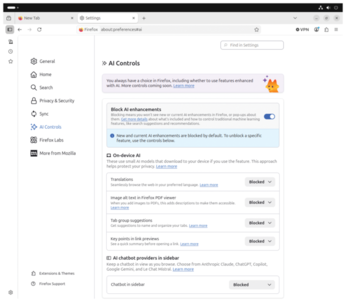
Ajit Varma, Head of Firefox, wrote in a recent blog post [1]: "AI is changing the web, and people want very different things from it." The solution, he says, is to offer clear and easy simple choices. One choice Firefox is offering users is a so-called AI kill switch, which they say "provides a single place to block current and future generative AI features in Firefox." This feature, which Mozilla calls Block AI enhancements (Figure 1), officially rolled it out in Firefox 148 [2] [3]. I used Wireshark, TLS decryption, and a series of controlled tests to explore what the kill switch actually does – and to study how Firefox is doing in general with protecting its users from corporate meddling. Note that I'm only looking at Firefox – I'm not comparing Firefox to other browsers. The types of problems uncovered in this article are not confined to a single browser or company, but then again, Mozilla presents Firefox as being better than other browsers at protecting openness and privacy, and that assertion sets the stage for this investigation.
What Mozilla Promises Its Users
According to Mozilla, the toggle in Settings | AI Controls blocks six generative AI features: translations, PDF alt-text generation, tab group suggestions (Smart Tab Groups), link previews with key points, the sidebar chatbot, and AI link previews (Figure 2). Mozilla explicitly clarifies in the documentation [4]: "The AI Controls settings panel does not include features that use traditional machine learning, such as systems that classify, rank, or personalize an experience."
[...]
Buy this article as PDF
(incl. VAT)