Making the Most of Cloud-Init on the Raspberry Pi

Automate Your Pi Setup

© Lead Image © Andrey Burmakin, 123RF.com
When booting a newer Raspberry Pi OS version, you might notice some cryptic cloud-init messages flash across the screen. We explain what they mean and how you can put them to good use.
Your Raspberry Pi may use cloud-init, but this does not mean that it joins some cloud during the installation. Instead it's using a bunch of scripts designed to keep your Rasp Pi properly configured and ready to use. All of this happens automatically in the background, but where does the necessary information come from?
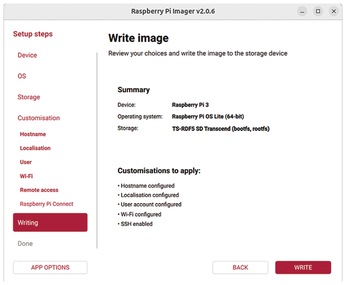
This is where the Raspberry Pi Imager (version 2.0 and later) enters the scene. If you download an official Raspberry Pi OS image off the web, the program guides you through a series of dialogs and prompts you for information such as user account and network details (Figure 1). If, however, you use traditional Linux onboard tools such as unxz or dd for writing the image, you miss out on that setup service, and the same happens if you use an official Raspberry Pi OS but do not re-download it.
[...]
Buy this article as PDF
(incl. VAT)