


Analyzing Public Infrastructure with Shodan
What Can I Do?
You can use Shodan for a variety of tasks, including:
- Reconnaissance – Security/cyber security engineers use Shodan to perform information gathering during pen testing or FlawScouting.
- Vulnerability discovery – Security analysts use CVEDB, one of Shodan's products, to gain insight into vulnerabilities
- Awareness – Because Shodan is noted for displaying devices connected to the Internet, security engineers rely on it to check if private services are accessible via the Internet due to misconfiguration.
Note that Shodan is not a tool for exploiting vulnerable devices. It just allows users to search for devices accessible via the Internet.
Using Shodan
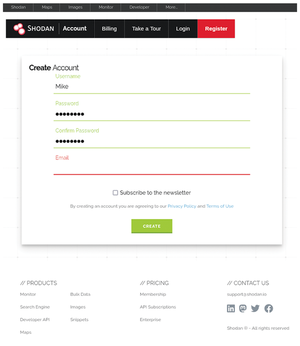
Before you use the Shodan search engine and other Shodan products, you need to create an account. Visit the Shodan registration page [3] to get started. You'll see a form similar to Figure 6.
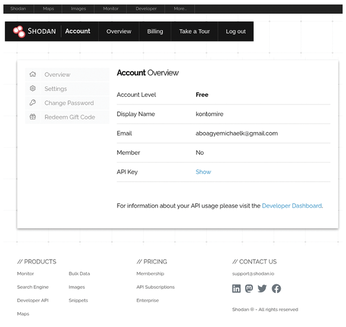
Once you have created an account, click on the API Key link to display your API key (Figure 7).
There are two APIs for accessing Shodan. The REST API provides methods to search for databases and web servers, look up hosts, summarize search results, and offers a variety of utilities for developers. The streaming API provides real-time feeds of data meant for large-scale consumption. Additionally, Shodan offers a catalog of libraries for programming languages such as Python and Java.
Analyzing CVEs with Shodan CVEDB
You can use the curl command to extract current CVE vulernability reports from Shodan. Note that Shodan retrieves approximately 1,000 rows of current CVEs at once with curl, which can be challenging to view or use. To extract the current vulnerabilities, use the following command:
curl https://cvedb.shodan.io/cves
The following command filters for vulnerabilities that are known to have been exploited in the wild:
curl https://cvedb.shodan.io/cves?is_key=true
To filter vulnerabilities by timestamp, use the following command:
curl https://cvedb.shodan.io/cves?start_date=2025-01-01&end_date=2024-01-01
Finally, to search for vulnerabilities by product, use the following:
curl https://cvedb.shodan.io/cves?product=postgres
Alternatively, you can use the requests library to search for a specific vulnerability. Open your Python interpreter with the following command:
python3
Then, execute the following command to check a specific vulnerability by its CVE ID:
import requests
CVE_ID = "CVE-2021-44228"
cve = requests.get(f"https://cvedb.shodan.io/cve/{CVE_ID}").json()
print(cve)
It is advisable to use a data analytic tool like Pandas [4] to analyze Shodan CVEDB results because Shodan enumerates many rows at once.
Shodan also provides a REST API for all their services. To search for all services associated with a specific host, use the following:
curl -X GET "https://api.shodan.io/shodan/host/8.8.8.8?key=GrcGnF06S3LcbsUWiAYnTy9kGLRgB6fJ"
Shodan also provides a command-line interface (CLI) tool to perform similar searches. Before you use the Shodan CLI tool, you need to install it. On Debian systems, create a virtualized environment using the command:
python -m venv venv
Then activate the virtual environment via the following:
source virtualenv/bin/activate
Finally, install Shodan CLI and initialize it with your API key:
pip install shodan
shodan init your_api_key
To search for services associated with a specific IP address using the Shodan CLI, you just need to enter the following:
shodan 1.1.1.1
where 1.1.1.1 is the IP address of the device you wish to study.
« Previous 1 2 3 Next »
Buy this article as PDF
(incl. VAT)
Buy Linux Magazine
Subscribe to our Linux Newsletters
Find Linux and Open Source Jobs
Subscribe to our ADMIN Newsletters
Support Our Work
Linux Magazine content is made possible with support from readers like you. Please consider contributing when you’ve found an article to be beneficial.

News
-
EU Open Source Strategy Plays Key Role in Tech Sovereignty Package
Comprehensive measures adopted by the European Commission aim to reduce dependency on non-EU countries.
-
Linux Foundation Report Indicates AI Driving Tech Hiring
Within growing security and skills gaps, AI has been found to be a positive driving force behind tech hiring trends in Europe.
-
United Nations Open Source Portal Goes Live
A new open source portal seeks to coordinate and scale open source efforts across the United Nations system.
-
KDE Linux Drops AUR
KDE Linux developers have dropped the Arch User Repository from the build pipeline due to security concerns; other distributions should consider doing the same.
-
California May Exempt Linux from Its Age-Verification Law
After backlash from the Linux community, California may be backing off on its promise to force all operating systems to verify age, but one platform may still have to comply.
-
Another Logic Bug Found in Linux Kernel
Qualys has discovered a vulnerability in the Linux kernel that can be used to elevate standard user privileges.
-
Ubuntu Core 26 Offers Game-Changing Enterprise Features
Ubuntu Core 26 could be a game-changer for organizations looking for increased security and reliability.
-
AI Flooding the Linux Kernel Security Mailing List
AI is giving Linus Torvalds a headache, but not in the way you might think.
-
Top Priorities for Open Source Pros Seeking a New Job
Professional fulfillment tops the list, according to LPI report.
-
Container-Based Fedora Hummingbird Designed for Agent-First Builders
Fedora Hummingbird brings the same approach to the host OS as it does to containers to level up security.