


Leave Geographical Breadcrumbs with Geofix

Productivity Sauce
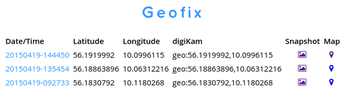
When I'm out and about, I often need to quickly record my current position. As an amateur photographer, I appreciate the ability to record the geographical coordinates of locations I plan to photograph later and spots I've already taken pictures of. The latter helps me to geotag my photos in digiKam. When I travel, I prefer to record the locations of good eateries, coffee shops, interesting places, etc. An Android device is perfect for this task, but none of the apps I tried fit my needs. So I cobbled together my own tool called Geofix. This relatively simple Python-based script can be used to obtain and store the geographical coordinates of the current location. The script uses both the network and GPS to obtain coordinates, and it stores the data in a text file and an SQLite database. This redundancy provides a fallback in case one of the sources is unavailable. The script also records the date and time for each entry and generates an OpenStreetMap link which can be used to preview the recorded location. There is also an option to take an accompanying snapshot.
Geofix comes with a simple web app based on the Python bottle framework. You can use the web app to view records in the SQLite database using a regular browser.
To deploy Geofix on your Android device, install the SL4A and PythonForAndroid APK packages from Android Scripting first. Copy then the geofix.py script to the sl4a/scripts directory on the internal storage of your Android device, and you are good to go. Open the SL4A app, and launch the script. For faster access, you can add to the homescreen an SL4A widget that links to the script.
Instead of using SL4A and Python for Android, which are all but abandoned by Google, you can opt for QPython. In this case, you need to use the geofix-qpython.py script. Copy it to the com.hipipal.qpyplus/scripts directory, and use the QPython app to launch the script.
comments powered by DisqusSubscribe to our Linux Newsletters
Find Linux and Open Source Jobs
Subscribe to our ADMIN Newsletters
Support Our Work
Linux Magazine content is made possible with support from readers like you. Please consider contributing when you’ve found an article to be beneficial.

News
-
PwnEscape Poses VM Vulnerability
A guest-to-host escape flaw in Linux KVM, named PwnEscape, might be yet another means of attacking Linux.
-
Linux Mint 27 Set for a Christmas Release
The developers behind Linux Mint have announced a Christmas release, and it looks like Santa's sack will be brimming with features.
-
Is Linus Torvalds Vibe Coding?
The creator of Linux has added AI into his process for Linux kernel development, and it's more than just for debugging.
-
openKylin 3.0 Released with Expanded AI Integration
The latest release features a pre-installed AI agent to help perform tasks.
-
DigitalOcean Ends Open Source Credits Program
In a change that has surprised many open source developers, DigitalOcean has decided to sunset its Open Source Credits Program.
-
Office 365 Available for Testing on Linux via Bottles
Linux users can now test the official Office 365, thanks to Mirko Brombin's work on Bottles.
-
Dutch Government Turns to Open Source for Digital Sovereignty
Following in the footsteps of other European countries, the Netherlands is looking to increase its sovereign digital infrastructure with open source software.
-
Linux May Soon Work on Snapdragon X2-Based PCs
If you're thinking about buying a Snapdragon X2-based desktop or laptop, Linux may soon be an option.
-
KDE for People Initiative Calls for AI Ban in Plasma
A new community of KDE wants the project to adopt a strict no-AI policy for KDE Plasma.
-
KDE Sets Ambitious Goals for 2026 and Beyond
KDE Connect reveals the goals for the Linux desktop darling, with one of those goals long overdue.