


sncli: Command-Line Client for Simple Note

Productivity Sauce
One of the things that make Simple Note such a convenient note-taking solution is the choice of client tools that let you access and edit notes on a variety of platforms and devices. But if you take a closer look at the list of available applications and utilities, you'll notice that it doesn't include any command-line tools. That doesn't mean, though, that CLI tools for Simple Note don't exist, and sncli is here to prove that. Written in Python, sncli boasts comprehensive functionality, including two-way sync, sorting, searching, editing, pinning, tag editing, and much more. The tool supports Vim-like key bindings and fully-customizable colors.
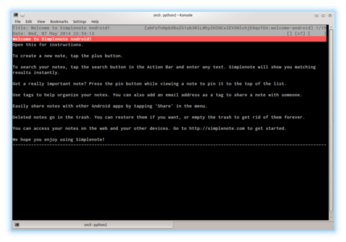
sncli has only two requirements: Python 2.x and the Urid module. To install the latter on Debian and Ubuntu, run the apt-get install python-urwid command as root. Clone then the project's GitHub repository using thehttps://github.com/insanum/sncli.git command (or grab and unpack the ZIP archive). Create the ~/.snclirc file and enter the following configuration into it, replacing the example values with your actual Simple Note user name and password:
[sncli]
cfg_sn_username = user@email.com
cfg_sn_password = password
You can then run sncli using the ./sncli command from the resulting directory, or you can install the tool by running the python setup.py install command as root. When you run sncli, the utility automatically syncs all notes, and you can view all available commands and their key bindings by pressing h.
comments powered by DisqusSubscribe to our Linux Newsletters
Find Linux and Open Source Jobs
Subscribe to our ADMIN Newsletters
Support Our Work
Linux Magazine content is made possible with support from readers like you. Please consider contributing when you’ve found an article to be beneficial.

News
-
Bottlenecks Discovered by Meta Engineers Lead to Scalability Improvements
Thanks to a small group of engineers at Meta, the Linux kernel module kernfs has been improved, which has led to some serious gains.
-
PwnEscape Poses VM Vulnerability
A guest-to-host escape flaw in Linux KVM, named PwnEscape, might be yet another means of attacking Linux.
-
Linux Mint 27 Set for a Christmas Release
The developers behind Linux Mint have announced a Christmas release, and it looks like Santa's sack will be brimming with features.
-
Is Linus Torvalds Vibe Coding?
The creator of Linux has added AI into his process for Linux kernel development, and it's more than just for debugging.
-
openKylin 3.0 Released with Expanded AI Integration
The latest release features a pre-installed AI agent to help perform tasks.
-
DigitalOcean Ends Open Source Credits Program
In a change that has surprised many open source developers, DigitalOcean has decided to sunset its Open Source Credits Program.
-
Office 365 Available for Testing on Linux via Bottles
Linux users can now test the official Office 365, thanks to Mirko Brombin's work on Bottles.
-
Dutch Government Turns to Open Source for Digital Sovereignty
Following in the footsteps of other European countries, the Netherlands is looking to increase its sovereign digital infrastructure with open source software.
-
Linux May Soon Work on Snapdragon X2-Based PCs
If you're thinking about buying a Snapdragon X2-based desktop or laptop, Linux may soon be an option.
-
KDE for People Initiative Calls for AI Ban in Plasma
A new community of KDE wants the project to adopt a strict no-AI policy for KDE Plasma.