Detecting intruders with a Raspberry Pi IDS
False Alerts?
Not every attack has to be dangerous. The orange message ALERT: ET DNS Query to a *.pw domain – Likely Hostile warns users against accessing a web page with the pw top-level domain. A quick search shows that someone updated a Buttercup password manager via the buttercup.pw website (Figure 7). There is no immediate danger from this.
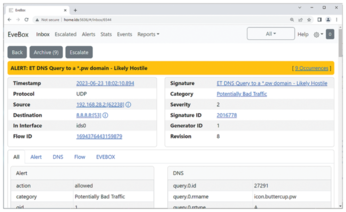
No machines running, but the IDS still reports something? No panic: How many smartphones, laptops, and smart home devices use your Fritz!Box? Every device on the network has an IP address, and every Suricata message contains that device's source and destination addresses. A quick look at the Fritz!Box subscriber list reveals which terminal this address belongs to. Granted: Once Suricata has annoyed you with the same message for about the hundredth time, you might want to remove this signature.
Security
An IDS does add a little more security, but the installation shown in this article is the beginning of any serious intrusion detection project. Some additions would still be required for robust enterprise use. The EveBox and M/Monit websites require HTTPS access with alert-free certificates. And you would need authentication, unless you want everyone to be able to view the logs.
Fritzdump expects the Fritz!Box password, but you would definitely not want this to be visible in the process list. It is better to store security-relevant information in variables or files with restrictive rights. And running Suricata with root privileges is questionable practice. You can change this in the run-as: section of the configuration file and use a dedicated IDS account instead.
A Raspberry Pi running Linux is not completely unprotected, but you would still want to enable a local firewall. Raspberry Pi OS offers the usual suspects: iptables, nftables, and firewalld. A firewall lets you restrict access to the required applications (SSH and HTTPS) and keep things within the boundaries of the local network. Finally, integration with an existing alerting system can be useful. If you lose sight of critical messages in the mass of files on the Rasp Pi, the IDS is not going to be a big help. Messages need to be displayed in good time on the admin's smartphone.
Conclusions
No IDS is capable of solving every imaginable security problem, but a good IDS is an important component for securing your network. Even on a low budget, a Raspberry Pi and the free Suricata software can handle intrusion detection, in conjunction with a compatible router like Fritz!Box.
Infos
- Suricata: https://suricata.io
- EveBox: https://evebox.org
- Fritzdump: https://github.com/ntop/ntopng/blob/dev/tools/fritzdump.sh
- M/Monit: https://mmonit.com
- M/Monit configuration for monitoring Suricata, EveBox, and Fritzdump: https://linuxnewmedia.thegood.cloud/s/5Rzx9tQW2FJ6N3Z
- Fail2Ban: https://www.fail2ban.org/wiki/index.php/Main_Page
« Previous 1 2 3 4
Buy this article as PDF
(incl. VAT)