Run a Single Program at Different Microcontroller Locations

Managing the Clones

© Lead Image © urbanhearts, Fotolia.com

© Lead Image © urbanhearts, Fotolia.com

Article from Issue 308/2026
Author(s):

Use common logic with DIP switches to determine functionality, IP addresses, hostnames, and other functional differences on repetitive hardware arrangements.

There are many projects where a common hardware setup is repeated in multiple locations. For systems with only three microcontrollers, creating unique logic for each instances is a sensible approach. However, when you work with over ten controllers, this can be a nightmare to maintain, debug, or add a new functionality.

This problem has a solution that is commonly used in industrial Modbus [1] and Remote Terminal Unit (RTU) [2] applications: it is to make use of Dual In-line Package (DIP) switches in the hardware setup. Typical applications for DIP switches include module addressing, defining I/O, and enabled debug features (Figure 1). Figure 2 shows DIP switches being used as selectors on relay, input/output boards, and a Raspberry Pi I/O shield.
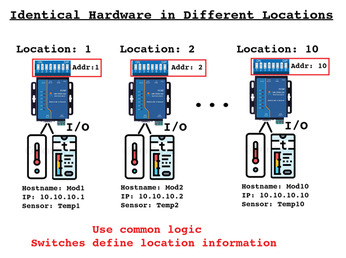
Figure 1: You can use common logic with DIP switches to give unique configuration at different microcontroller locations.

[...]

Use Express-Checkout link below to read the full article (PDF).

Buy this article as PDF

Download Article PDF now with Express Checkout
Price $2.95
(incl. VAT)

Buy Linux Magazine

Related content

  • Raspberry Pi 5 Remote Boot

    In addition to enhanced performance, the Raspberry Pi 5 also comes with some new hidden functions, including options for time-controlled and remote start-up and shutdown.

  • Pico Sleep Mode

    The Raspberry Pi Pico's high-performance chip is trimmed for I/O and does not try to save power. However, a few tricks in battery mode can keep it running longer.

  • Smart Home Info Center

    You don't need much to create a smart home information center – just a Raspberry Pi Pico, an ePaper panel, a battery, and some Python.

  • Bluetooth Communication

    We use a Raspberry Pi, a Pi Pico, and a smartphone to communicate over Bluetooth.

  • PWM Buzzer

    Use the buzzer to have your MCU play small wake-up melodies, signals, or music to accompany LED animations. The sound might not be a feast for the ears, but it does give your projects a great retro feel.

comments powered by Disqus