


Adding graphic elements to your scripts with Zenity and KDialog

Shell Click

© www.sxc.hu
Zenity and KDialog let you integrate your scripts with the native KDE or Gnome environment.
A full-blown GUI-based application is beautiful to behold, but a graphical interface is way more trouble to create than a simple shell script. If you like the simplicity of scripting, but you prefer a little more visual feedback, Zenity (for Gnome environments) and KDialog (for KDE) are a pair of tools you should know about. These handy helpers let you integrate graphic dialog boxes into your scripts.
Dialog boxes prompt users for input, display output, or just report progress on a process. Zenity and KDialog also output error messages and general status information in the form of visual feedback, and you'll never need to type pathnames painstakingly; instead, you can use a graphical file browser.
Zenity [1] is included by default with the Gnome desktop in openSUSE, Ubuntu, and several other distros. KDialog is often installed with the default KDE environment. If your distribution does not include these tools, install the kde4-dialog or zenity package to get started. If you write scripts for other people, the computers that run those scripts will also need Zenity or KDialog. It is a good idea to incorporate a test into your script that checks for the presence of Zenity or KDialog before invoking their commands.
The simple Shell script in Listing 1 is a good place to start. If you save the script as zenity, type chmod u+x zenity to make it executable, and then type ./zenity to launch, you should see a slider control as in Figure 1. Because the dialog box does not have a name and the text for the slider is missing, Zenity uses standard labels.
Listing 1
Simple Zenity Script
Table 1 shows the different Zenity dialog box types. The parameters that Zenity uses to call them are on the left with a picture of the dialog box next to it.
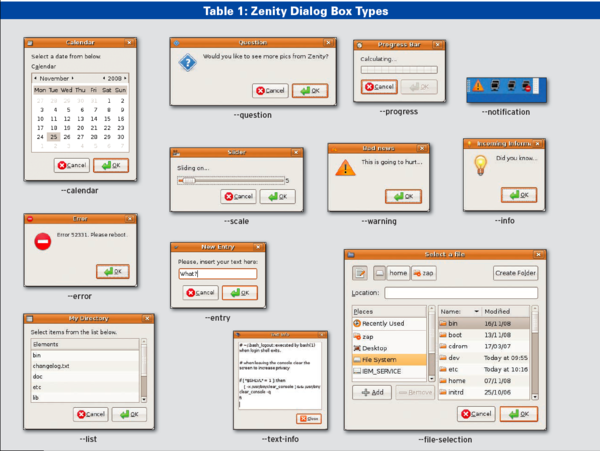
As you can see, the selection includes input fields. Bash reads these fields when you click OK; the --entry field is an example of this. To pass a numeric value to Bash, use the slider (--scale). The --list control lists information and supports sorting if you click a field name.
A progress indicator is useful wherever you need to monitor progress; for example, you could use one to show the progress of a search. But I'll look at the basics first.
To label a window, you generally want to use the --title keyword. Listing 2 shows how to let the user select a value between 1 (--min-value=1) and 10 (--max-value=10) and assign a default of 5 (--value=5). This gives you a dialog like that shown in Figure 1.
Listing 2
Generating Numbers with a Slider
Of course, you can feed only a limited number of parameters to a slider: man zenity has a separate Scale Options section outlining the options that work with --scale. A --warning field only supports text definitions and new lines, for example. Some types need to be combined with other commands to be effective. The command
ls | zenity --list --column "Show Directory"
lists the files in a directory and sorts them alphabetically when you click Show Directory (Figure 2).
Although Zenity will build interesting graphical menus for you, it does not take the task of designing program logic off your hands. Therefore, you need an If condition to tell the script what to do when you click Yes or No. In general, Zenity and KDialog define two internal return values for dialog boxes: A positive result (Yes) returns 0 and a negative result (No) returns 1. A third result – such as Cancel from KDialog – would return 2. You can create conditional statements by querying these return values.
On Top of KDE
KDialog users can follow a similar approach to create graphical dialog boxes. Table 2 shows which commands create which elements. KDialog has a couple of additional dialogs that Zenity does not have. For example, to have the user confirm a file deletion, enter:
kdialog --yesno "Do you really want to remove this file?"
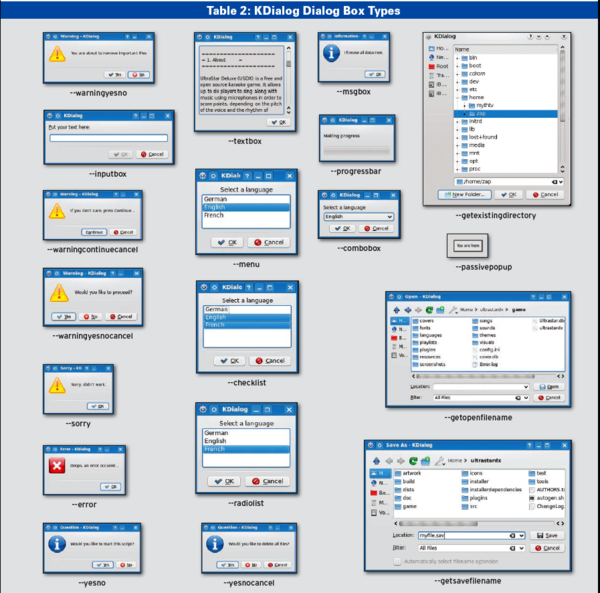
The question appears in a dialog box with Yes and No buttons. If you want to label the field, add a title (Figure 3):
kdialog --title "Yes or No"
--yesno "Do you really want to remove this file?"
In contrast to Zenity, KDialog complains if you just type kdialog --yesno without adding text – the program does not generate default labels.
If you enter text in a field, it is typically displayed on the console, which is the standard output device, but you also can pipe the output into a file – for example, file1.txt (Listing 3, line 1). Alternatively, you can pass the results to a variable (Listing 3, lines 2 and 3).
Listing 3
Passing the Results to a Variable
In addition to the messages mentioned here, the --dontagain switch makes sure that KDialog does not continually repeat a question. This displays a Do not show this message again checkbox on top of the Yes/No dialog.
kdialog --dontagain rememberfile:decision --yesno "Do you really want to delete this file?"
The rememberfile:decision entry makes sure that the dialog really does remember your decision. KDialog creates a file called rememberfile below ~/.kde/share/config/ and stores your decision in the decision variable as the following test shows:
$ cat ~/.kde/share/ config/rememberfile
[Notification Messages]
decision=yes
In this case, the script would autorespond Yes whenever this question is posed.
KDialog dialog boxes typically have a couple more switches that I'll look at. If you get stuck, man kdialog and the overview in the KDialog manual [2] will help you with the details.
The --passivepopup option lets you display a short message to users. It pops up a bubble in a dialog and tells the user something (Figure 4). A number following the pop-up text specifies how long you want the text to display (this is set to five seconds in line 1 of Listing 4). A /n sequence adds a line break to the dialog box text to keep it from spreading all over the screen.
Listing 4
Opening a Specific File Type
If you want to select a specific file on disk, it makes sense to use the --getopenfilename option to do so. This returns an absolute pathname, such as /home/user/song.mp3. Another very similar parameter, --getopenurl, returns a URL, as in file:/home/user/song.mp3. For example, you can use this approach to open FTP addresses. Their counterparts that save files are --getsavefilename and --getsaveurl.
To open only specific file types – such as MP3-formatted tracks – just add a descriptor to the command (Listing 4, line 2). KDialog shows the MP3 files entry as a Filter (see Figure 5); if you delete the pipe and the entry, you see the file suffix instead.
After --getopenfilename, you normally pass in the path the dialog box opens – in this example, it was the current working directory. If you replace this entry with :label1, the file manager will start where you left it last time; that is, it remembers the last directory you used.
Conclusions
If you author scripts for other users, dialog boxes give them useful visual feedback – especially if they are newcomers.
Finally, a word of warning: Don't be surprised if you find yourself re-writing working scripts and get so used to the convenience that you don't want to do without the reassurance of visual feedback.
Buy this article as PDF
(incl. VAT)
Buy Linux Magazine


US / Canada
UK / Australia
Subscribe to our Linux Newsletters
Find Linux and Open Source Jobs
Subscribe to our ADMIN Newsletters
Support Our Work
Linux Magazine content is made possible with support from readers like you. Please consider contributing when you’ve found an article to be beneficial.

News
-
Canonical Releases Ubuntu 24.04
After a brief pause because of the XZ vulnerability, Ubuntu 24.04 is now available for install.
-
Linux Servers Targeted by Akira Ransomware
A group of bad actors who have already extorted $42 million have their sights set on the Linux platform.
-
TUXEDO Computers Unveils Linux Laptop Featuring AMD Ryzen CPU
This latest release is the first laptop to include the new CPU from Ryzen and Linux preinstalled.
-
XZ Gets the All-Clear
The back door xz vulnerability has been officially reverted for Fedora 40 and versions 38 and 39 were never affected.
-
Canonical Collaborates with Qualcomm on New Venture
This new joint effort is geared toward bringing Ubuntu and Ubuntu Core to Qualcomm-powered devices.
-
Kodi 21.0 Open-Source Entertainment Hub Released
After a year of development, the award-winning Kodi cross-platform, media center software is now available with many new additions and improvements.
-
Linux Usage Increases in Two Key Areas
If market share is your thing, you'll be happy to know that Linux is on the rise in two areas that, if they keep climbing, could have serious meaning for Linux's future.
-
Vulnerability Discovered in xz Libraries
An urgent alert for Fedora 40 has been posted and users should pay attention.
-
Canonical Bumps LTS Support to 12 years
If you're worried that your Ubuntu LTS release won't be supported long enough to last, Canonical has a surprise for you in the form of 12 years of security coverage.
-
Fedora 40 Beta Released Soon
With the official release of Fedora 40 coming in April, it's almost time to download the beta and see what's new.