


Use a Regular Keyboard with Your Android Device with the WiFi Keyboard App

Productivity Sauce
When it comes to virtual keyboard apps for Android, you're spoiled for choice. Still, even the best virtual keyboard can't compete with a physical full-size keyboard. Using a USB OTG cable, you can connect a real keyboard to your Android device (provided it supports this functionality). But if you need to quickly type a message or a note on when sitting in front of your desktop machine or notebook, the WiFi Keyboard app provides an alternative solution. Install the app, then activate the WiFi keyboard option in the Settings | Language and input section on your Android device. Launch the WiFi Keyboard app and note the generated URL. Open an app and select WiFi keyboard as the input method. Point the browser on your desktop machine or notebook to the URL, and you should see the WiFi Keyboard interface.
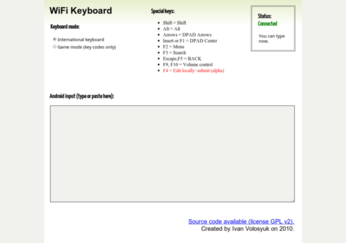
Start typing in the Android input field, and the text automatically appears on your Android device. Alternatively, you can enable editing mode by pressing the F4 key. This way, you can type and edit text in the Android input field and then push the text to the Android device by pressing F4. Since the app requires no additional software installed on the desktop machine, you can use any computer with a browser for text input.
comments powered by DisqusSubscribe to our Linux Newsletters
Find Linux and Open Source Jobs
Subscribe to our ADMIN Newsletters
Support Our Work
Linux Magazine content is made possible with support from readers like you. Please consider contributing when you’ve found an article to be beneficial.

News
-
OSJH and LPI Release 2024 Open Source Pros Job Survey Results
See what open source professionals look for in a new role.
-
Proton 9.0-1 Released to Improve Gaming with Steam
The latest release of Proton 9 adds several improvements and fixes an issue that has been problematic for Linux users.
-
So Long Neofetch and Thanks for the Info
Today is a day that every Linux user who enjoys bragging about their system(s) will mourn, as Neofetch has come to an end.
-
Ubuntu 24.04 Comes with a “Flaw"
If you're thinking you might want to upgrade from your current Ubuntu release to the latest, there's something you might want to consider before doing so.
-
Canonical Releases Ubuntu 24.04
After a brief pause because of the XZ vulnerability, Ubuntu 24.04 is now available for install.
-
Linux Servers Targeted by Akira Ransomware
A group of bad actors who have already extorted $42 million have their sights set on the Linux platform.
-
TUXEDO Computers Unveils Linux Laptop Featuring AMD Ryzen CPU
This latest release is the first laptop to include the new CPU from Ryzen and Linux preinstalled.
-
XZ Gets the All-Clear
The back door xz vulnerability has been officially reverted for Fedora 40 and versions 38 and 39 were never affected.
-
Canonical Collaborates with Qualcomm on New Venture
This new joint effort is geared toward bringing Ubuntu and Ubuntu Core to Qualcomm-powered devices.
-
Kodi 21.0 Open-Source Entertainment Hub Released
After a year of development, the award-winning Kodi cross-platform, media center software is now available with many new additions and improvements.