


Detecting intruders with a Raspberry Pi IDS
IDS Test
Everything is ready to go, but you will want to test the setup to make sure that your home IDS is working correctly. Much like EICAR for virus scanners, there is a prepared web page that should attract the attention of any active IDS.
For this test, a client on the home network needs to access the website on http://testmynids.org/uid/index.html. It doesn't matter whether you do this in a web browser or use curl, as long as you access the website via the Fritz!Box. The important thing is that Suricata detects the pseudo attack and EveBox displays it as GPL ATTACK_RESPONSE id check returned root (Figure 4).

Slimming Down
By default, Suricata stores a huge amount of information and statistics, which bloats the logfiles in next to no time. On top of this, the bloat makes it more difficult for EveBox to find the genuine alerts, and this results in more disk I/O to the flash memory device. A RAM disk can help, but it definitely makes more sense simply not to store the values you don't need.
To do this, you have to modify the suricata.yaml configuration file. The YAML format uses indentations and reads like an outline, with topics and bullet points. Suricata lists everything intended for the eve.json logfile below outputs in the eve-log subsection. For use on a Raspberry Pi, the recommendation is to comment out all output formats listed in types, or to set them to false, with the exception of alert, anomaly, and drop (Figure 5).

The next savings relate to the signatures. In the previous section, I already ditched three control groups. If EveBox reports more alarms that are false, unnecessary, or simply a nuisance, you can add an entry to the disable.conf file and then update the signature database.
If the Rasp Pi is still sluggish after the cleanup, it makes sense to empty EveBox's SQLite database in /var/lib/evebox/ or to create a new eve.json in /var/log/suricata/. In both cases, you will need to restart the service using Systemctl.
Last but not least, check the load on the Fritz!Box when the IDS is enabled. Older models might be overtaxed by the continuous PCAP file download, leading to a reduced throughput rate. For example, a Fritz!Box 6591 on a 100Mbit/s cable connection from Vodafone still achieves about 75Mbit/s in the download direction with the home IDS running. Obviously, the upload rate is not affected at all. It is important to weigh up whether security or performance is your priority.
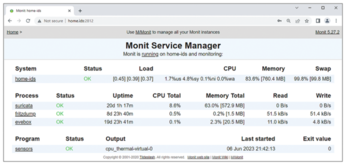
The IDS only works when the Fritzdump and Suricata processes are running. If not, the intrusion detection network is worthless and dangerous IP packets remain undetected. A small monitoring tool like M/Monit [4] can check for the critical processes and restart them if necessary (Listing 7).
Listing 7
Setting Up M/Monit
# apt install monit
# cat <<EOF >> /etc/monit/monitrc
set httpd port 2812 and
  use address 0.0.0.0
  allow admin:monit
EOF
# systemctl restart monit
A configuration file for all the home IDS's services is available in the download section for this article [5]. You need to store the monit_ids.conf file in the /etc/monit/conf.d/ directory. M/Monit uses it automatically on restart. If you access the page at http://Ras_Pi_IP:2812, or if you run the monit summary CLI command, your watcher will give you information about the status of the services it is looking after (Figure 6).
Evaluating Alerts
EveBox uses color highlighting to show the meaning of a message. Hints are shown in turquoise in the Light Theme, attacks in orange, and critical conditions in red (Figure 3). The dark theme makes it difficult to see the colors; important messages no longer stand out sufficiently. Clicking on the message takes you to the detailed view with all the information that Suricata has recorded. Suricata uses the Severity value to indicate how threatening it considers an alert to be. EveBox uses this numerical value to color highlight the message.
The next step is to find out which client triggered the alarm. The Source and Destination fields show the offending IP addresses, including port numbers, but without resolving to a hostname or application. If the alert title is unclear, the signature ID can help; you can use the signature ID to find the rule in the signature files. If you need more details on a signature, grep will give them:
$ grep signature_ID /etc/suricata/rules/*
The result is the syntax of the signature as Suricata reads and processes it. Editors with appropriate syntax highlighting, such as Visual Studio Code, make the content more readable.
For example, a message such as ALERT: ET CINS Active Threat Intelligence Poor Reputation IP group 48 points to a suspicious incoming HTTP packet on the LAN. It appears that there is a public web server on the local network that can be accessed from any IP address on the Internet. Neither Suricata nor EveBox recommend any specific action in this case, but both tools at least make the admin aware of the issue. In the simplest case, this might mean a forgotten port forward. However, the message suggests that the company's own web server is under attack. Meaningful responses include using a GeoIP blocker or a DDoS tool such as Fail2Ban [6].
« Previous 1 2 3 4 Next »
Buy this article as PDF
(incl. VAT)
Buy Linux Magazine
Subscribe to our Linux Newsletters
Find Linux and Open Source Jobs
Subscribe to our ADMIN Newsletters
Support Our Work
Linux Magazine content is made possible with support from readers like you. Please consider contributing when you’ve found an article to be beneficial.

News
-
It’s Time to Test Fedora 45 Beta
Fedora 45 beta has been released with updated Gnome, KDE Plasma, and kernel.
-
Ubuntu Stonking Stingray Gets Even Rustier
Ubuntu 26.10 has completed its migration to the Rust-based coreutils.
-
AI Fixes Linux Bottlenecks Using “Hideous” Code
A Linux developer used AI to fix bottlenecks that caused problems when building the kernel. The resulting AI-generated code needed a lot of work.
-
Advanced Video Coding Still Under Patent
Brazilian patent BRPI0109962B1 has expired, which means that DivX and Xvid are no longer problematic for Linux, but it doesn’t mean that video is all of a sudden fully unleashed.
-
2,000 Vulnerabilities per Linux Release
Thanks to AI bug hunters, the Linux kernel is seeing record numbers of vulnerabilities, and it's overwhelming developers.
-
Linux Exempt from California’s Age Verification Law
So long as Linux is distributed under the GPL, MIT, BSD, and Apache licenses, the OS is exempt from being required to verify the age of its users in California.
-
Roll Out the Cake: Linux Turns 35
35 years ago, a Finnish student began a humble project that would forever change the course of technology.
-
China Switching from Windows to Linux
China has ordered several government agencies to drop a Chinese-developed version of Windows 10 in favor of either KylinOS or UOS.
-
Pine64 Halts Production of Linux Devices
With continued DRAM and eMMC shortages, Pine64 has decided to discontinue production of Linux devices.
-
The Bullet-Proof KDE Software Initiative Is Coming
KDE, Techpaladin, and Kubuntu Focus have announced a new initiative that will provide at least three years of support for KDE Plasma 6.6 LTS and related software.