


Keep your containers updated with What's up Docker?
Monitor Other Docker Hosts
To enable WUD to monitor containers on other Docker hosts, add an extra environment variable for a host instead of a socket (the default option). You can also set different properties for that host, for instance,
environment:
      - WUD_WATCHER_LOCAL_CRON=5 3 * * *
      - WUD_WATCHER_RUBUS_HOST=rubus.home
      - WUD_WATCHER_RUBUS_CRON=5 4 * * *
On that host, the Docker engine must be configured to listen on port 2375. Instructions can be found in the Docker documentation about remote access [9]. The RUBUS in the environment variable is a name you can choose (which can differ from the hostname), while LOCAL always refers to the host where WUD is running.
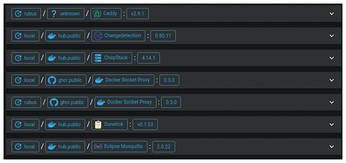
After running docker-compose up -d, WUD shows containers from all hosts defined in its watchers, in a path-like notation: first the watcher's name, then the container registry, the container (with its defined name and icon), and then the version, optionally followed by the latest available new version (Figure 6).
Add Triggers
Now that you see all available updates for your containers in WUD's web interface, you still need to check this web page manually. However, you can define triggers to receive notifications when an update becomes available for your containers. WUD currently supports around 15 types of triggers, including email, ntfy [10], MQTT, Slack, Telegram, and Discord.
I'll demonstrate how to configure a trigger that emails you each available update. Use the environment variables from Listing 2 for the WUD container. This example uses Mailjet [11], a French email provider allowing up to 200 emails per day under its free plan. Populate these fields with your account information from your own email provider.
Listing 2
Email Trigger Configuration
    environment:
      - WUD_TRIGGER_SMTP_MAILJET_HOST=in-v3.mailjet.com
      - WUD_TRIGGER_SMTP_MAILJET_PORT=587
      - WUD_TRIGGER_SMTP_MAILJET_USER=17326117626d402dadc3864b59000095
      - WUD_TRIGGER_SMTP_MAILJET_PASS=73c460f8d48b4d159c273b1a6ba4ae8a
      - WUD_TRIGGER_SMTP_MAILJET_FROM=wud@example.com
      - WUD_TRIGGER_SMTP_MAILJET_TO=me@example.com
After restarting the WUD container, you'll receive an email whenever a new version is available for one of your containers, including a link to the release notes for quick verification whether updating is recommended.
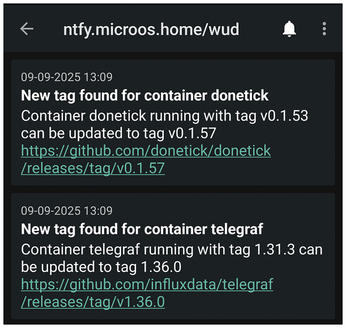
If you've set up the notification service ntfy, you can add a trigger with the configuration from Listing 3. Make sure to set a username and password for an account that has write permissions for the topic, and use the correct URL. If the ntfy container runs from the same Docker Compose file, both containers are in the same network, so you can just use the container name (ntfy in this example) as the hostname. If successful, you'll see alerts about new updates in ntfy's Android app (Figure 7).
Listing 3
Ntfy Trigger Configuration
    environment:
      - WUD_TRIGGER_NTFY_LOCAL_URL=http://ntfy
      - WUD_TRIGGER_NTFY_LOCAL_AUTH_USER=wud
      - WUD_TRIGGER_NTFY_LOCAL_AUTH_PASSWORD=wafpjuN04CCSFy8TFnGK
      - WUD_TRIGGER_NTFY_LOCAL_TOPIC=wud
Update Your Docker Compose File
WUD triggers are not only useful for notifications. One available trigger is for Docker Compose. When you have this configured, WUD updates your Docker Compose file with the new version tag and recreates the container upon detecting an update. As previously explained, automating this process is not recommended. However, you can add the trigger and configure WUD to not execute it automatically. This allows manual triggering from WUD's web interface to update the container. Note that this functionality is only available for the local Docker host.
Configuration is once again done using the appropriate environment variables for the WUD container, but you also need to mount your Docker Compose file inside the container for modifications. Listing 4 illustrates this setup. With WUD_TRIGGER_DOCKERCOMPOSE_LOCAL_PRUNE=true, WUD removes the old image post-update, while WUD_TRIGGER_DOCKERCOMPOSE_LOCAL_AUTO=false disables automatic trigger execution.
Listing 4
Update Docker Compose File from WUD Web Interface
    volumes:
      - ./docker-compose.yml:/wud/docker-compose.yml
    environment:
      - WUD_TRIGGER_DOCKERCOMPOSE_LOCAL_FILE=/wud/docker-compose.yml
      - WUD_TRIGGER_DOCKERCOMPOSE_LOCAL_PRUNE=true
      - WUD_TRIGGER_DOCKERCOMPOSE_LOCAL_AUTO=false
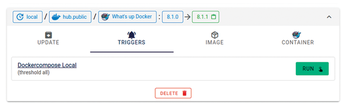
After docker-compose up -d, explore the Triggers tab in WUD's web interface to view all configured triggers for each container (Figure 8). Click Run beside the Docker Compose trigger to update the container via a Docker Compose file modification. If your containers are defined in multiple Docker Compose files, just add all files as volumes and add extra environment variables WUD_TRIGGER_DOCKERCOMPOSE_{OTHER}_FILE, WUD_TRIGGER_DOCKERCOMPOSE_{OTHER}_PRUNE, and WUD_TRIGGER_DOCKERCOMPOSE_{OTHER}_AUTO.
« Previous 1 2 3 4 Next »
Buy this article as PDF
(incl. VAT)
Buy Linux Magazine
Subscribe to our Linux Newsletters
Find Linux and Open Source Jobs
Subscribe to our ADMIN Newsletters
Support Our Work
Linux Magazine content is made possible with support from readers like you. Please consider contributing when you’ve found an article to be beneficial.

News
-
Ubuntu MATE Dev Leaving After 12 years
Martin Wimpress, the maintainer of Ubuntu MATE, is now searching for his successor. Are you the next in line?
-
Kali Linux Waxes Nostalgic with BackTrack Mode
For those who've used Kali Linux since its inception, the changes with the new release are sure to put a smile on your face.
-
Gnome 50 Smooths Out NVIDIA GPU Issues
Gamers rejoice, your favorite pastime just got better with Gnome 50 and NVIDIA GPUs.
-
System76 Retools Thelio Desktop
The new Thelio Mira has landed with improved performance, repairability, and front-facing ports alongside a high-quality tempered glass facade.
-
Some Linux Distros Skirt Age Verification Laws
After California introduced an age verification law recently, open source operating system developers have had to get creative with how they deal with it.
-
UN Creates Open Source Portal
In a quest to strengthen open source collaboration, the United Nations Office of Information and Communications Technology has created a new portal.
-
Latest Linux Kernel RC Contains Changes Galore
Linux kernel 7.0-rc3 includes more changes than have been made in a single release in recent history.
-
Nitrux 6.0 Now Ready to Rock Your World
The latest iteration of the Debian-based distribution includes all kinds of newness.
-
Linux Foundation Reports that Open Source Delivers Better ROI
In a report that may surprise no one in the Linux community, the Linux Foundation found that businesses are finding a 5X return on investment with open source software.
-
Keep Android Open
Google has announced that, soon, anyone looking to develop Android apps will have to first register centrally with Google.