


Maps with uMap

DIY Maps

© Lead Image © Matttilda, fotolia.com
uMap provides an easy way to create advanced maps based on the OpenStreetMap service. This article explains how to put uMap's features and functionality to practical use.
Thanks to its open nature, OpenStreetMap spurred a large number of genuinely useful applications that piggy-back on this excellent map project. uMap [1] is a case in point: This web-based application allows you to create multi-layered maps complete with markers, lines, and polygons (Figure 1).
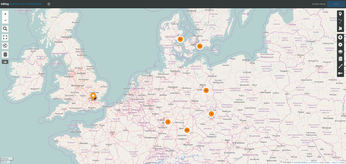
uMap software is released under an open source license, and the project's website provides instructions on how to deploy a uMap instance on your own server. This is not a trivial task, though. So, it probably makes sense to start with a hosted service. You can choose from several hosted uMap installations, including the one maintained by uMap developers at umap.openstreetmap.fr. Although you can use the service anonymously, it's worth creating an account, because this allows you to save and manage your maps. uMap supports several popular sign-in providers, including GitHub, Bitbucket, Twitter, and, of course, OpenStreetMap. Once you've signed in, click the Create a map button to generate a map.
[...]
Buy this article as PDF
(incl. VAT)
Buy Linux Magazine
Subscribe to our Linux Newsletters
Find Linux and Open Source Jobs
Subscribe to our ADMIN Newsletters
Support Our Work
Linux Magazine content is made possible with support from readers like you. Please consider contributing when you’ve found an article to be beneficial.

News
-
Linux Surpasses Double-Digit Market Share
According to two sources, the Linux operating system has hit a major milestone in market share that naysayers thought would never happen.
-
AI Helped Develop a Linux Exploit
A use-after-free race exploit was discovered and exploited on CentOS Stream 9.
-
Yet Another Linux Kernel Vulnerability Discovered
Affecting millions of systems, a kernel flaw discovered by Qualys could allow users to gain root privileges.
-
Ubuntu 26.10 to Include Ubuntu Certified Hardware Check
If you've ever wondered if your laptop or PC is officially certified to run Ubuntu, that curiosity will soon be met.
-
Substantial Update to IPFire Now Available
The lastest version of IPFire features a fundamental change to how the system handles DNS.
-
Gnome Working on Test Center App to Make Testing Easier
It's now possible to test experimental features on the Gnome desktop without worrying that you'll break things.
-
New Vulnerability Discovered in Linux Kernel
Hiding out for nearly 15 years, the Ghostlock vulnerability allows a standard logged-in user to gain root privileges.
-
New Linux Flaw Lets Attackers Escape VMs
A 16-year-old vulnerability allows an attacker to escape a virtual machine, gain access to the host, and execute malicious code.
-
Hannah Montana Linux Is Back!
Developer Noah Cagle decided the world needed the once obscure but beloved Linux distribution and gave it a decidedly pink refresh.
-
System76 Refreshes the Lemur Laptop
If you're looking for a laptop with tons of power and battery, look no further than the latest iteration of the System76 Lemur Pro.