


Control your Rasp Pi projects with Python’s Tkinter library

The Tinkerer

© Lead Image © agor2012, 123RF.com
Use Tkinter to control your Rasp Pi projects from a smartphone or tablet.
If you are looking for an easy way to control your Raspberry Pi projects, consider Python's Tkinter library. In about 20 lines of Python code, you can create a graphic program to control a Rasp Pi rover project (Figure 1). This article shows how to create a Python Tkinter application to control the Rasp Pi's General Purpose Input Output (GPIO) pins. I will also show you how to set up a desktop shortcut that you can use to easily launch the application, and I will configure a Virtual Network Computing (VNC) server so that a smartphone, tablet, or PC can control the Rasp Pi remotely.
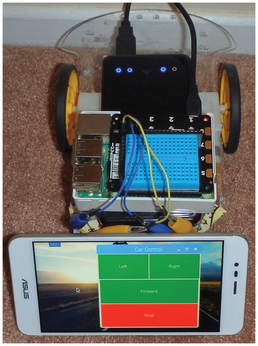
Python Tkinter Library
Tkinter [1] is bundled with the standard Rasp Pi Python installation. The base Tkinter library contains 17 different widgets that you can use for graphic applications. These widgets can be defined with customizable colors, sizes, text, and commands. There are three geometry managers (Pack, Grid, and Place) that can be used to arrange the widgets. For Rasp Pi hardware projects, I found the Grid geometry manager was a good fit. Listing 1 is a simple test program that presents two buttons in a grid and prints feedback when the buttons are pressed. (Note: Python 2.7 references the library as Tkinter, whereas Python 3 uses tkinter, lowercase). Figure 2 shows this test program with some button feedback.
[...]
Buy this article as PDF
(incl. VAT)
Buy Linux Magazine
Subscribe to our Linux Newsletters
Find Linux and Open Source Jobs
Subscribe to our ADMIN Newsletters
Support Our Work
Linux Magazine content is made possible with support from readers like you. Please consider contributing when you’ve found an article to be beneficial.

News
-
System76 Announces the New Thelio Prime Desktop
The makers of the Thelio desktop line and Pop!_OS have released a powerful small form factor PC.
-
A Must See KDE Documentary
It doesn't matter what desktop environment you prefer, this KDE documentary should top your list of things to watch.
-
New KORA Linux Distro to Harness the Power of Local AI
The development team behind CyanogenMod, Android, and Playtron unveils KORA, a Linux distribution built specifically for AI nerds.
-
Epic Games Targets Linux for New Launcher
The Epic Games new launcher is still in preview, but it looks to land on several Linux distributions.
-
Fedora 45 Now Available
The latest iteration of Fedora has arrived with Gnome 51 and KDE Plasma 6.8.
-
Linux 7.4 is "Much Healthier" Thanks to AI
At nearly 42 million lines, Linux 7.4 is the largest merge in the kernel’s history.
-
Working Exploit for a Linux Kernel Flaw Made Public
Even before a bug received its CVE identifier or an upstream fix, the local privilege escalation vulnerability exploit found its way into the wild.
-
r/opensource Bans AI-Assisted and AI-Related Projects
The de facto subreddit for all things open source has not only banned AI-related projects but also users who "don't speak English."
-
Bottlenecks Discovered by Meta Engineers Lead to Scalability Improvements
Thanks to a small group of engineers at Meta, the Linux kernel module kernfs has been improved, which has led to some serious gains.
-
PwnEscape Poses VM Vulnerability
A guest-to-host escape flaw in Linux KVM, named PwnEscape, might be yet another means of attacking Linux.