


Filesystem Searching with Clapgrep and Recoll

Search Party

© Lead Image © damedeeso, 123RF.com
Clapgrep and Recoll edge out grep for filesystem searches thanks to straightforward graphical user interfaces.
When it comes to searching on Linux, there are various options available to users. The two main players in search operations for, and inside, files are the find [1] and grep [2] command-line tools. While find searches for file name, age, size, and more, grep, which was developed by Unix co-developer Ken Thompson, is a specialist tool that focuses on processing data streams and pattern searching. Regular expressions (regexes) are often used as search patterns. Of course, not everyone is enthralled with the idea of zapping their brain with regexes, which prompted this article on Clapgrep, a variant of grep that has an easily accessible graphical user interface (GUI).
Clapgrep, which only saw the light of day at the start of 2025, has not yet made its way into most distribution archives, although it is available in the Arch Linux AUR. Clapgrep is also available as a Flatpak on Flathub [3]. Clapgrep's source code, which is licensed under GPLv3, is also available on GitHub [4]. However, you will need a very recent platform, such as Fedora Rawhide, to build the application from the source code, making the Flatpak option the approach of choice for the majority of users.
Searching with Clapgrep
Imagine you have a directory with hundreds or even thousands of files. You know that it contains some information that you need, but you have no idea which file the information is hiding in, not to mention which line. This is a typical case for grep or its derivative Ripgrep [5].
Ripgrep is the grep implementation in Rust. Clapgrep uses Ripgrep as the engine for actual searches in the background. Besides the faster speed that Rust achieves, Ripgrep offers many additional features such as multithreading, support for .gitignore, Unicode, and more efficient regex processing, but it is still a command-line tool.
While grep and Ripgrep are optimized for searching text files, Clapgrep also searches PDFs and Office documents. With Office documents, it additionally searches for metadata such as the page and line numbers; this is something that grep and Ripgrep cannot do directly. Future plans include other data types, such as ePubs and ZIP archives, or the ability to find screenshots. In addition, the developers are looking to use a cache for successive searches, with the extracted text to be stored in an SQLite database indexed with a hash of the file path and last change date. Finally, an AppImage in addition to the Flatpak is in the pipeline.
In Clapgrep's search options, you can disable regexes, enable case sensitivity, and include hidden and ignored files. Search results can be opened directly from the interface with a text editor to simplify the workflow. A progress bar provides information about the search progress, the number of files processed, and the number of hits.
Differences
Ripgrep, grep, and Clapgrep run and display their results differently. A typical, fairly simple search request with grep might look like Listing 1.
Listing 1
Simple search query
01 $ grep -r -n -i 'ripgrep' /home/ft/work/Linux-User/
Listing 1 searches for the term "ripgrep" in the Linux-User folder of the user's home directory (Figure 1). The -r parameter triggers a recursive search of the entire folder, -n outputs the line number of the search result, and -i finds both lowercase and uppercase terms.
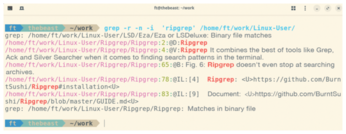
No Color
The same search request in Ripgrep does not require -r, as grep -r is called in the background. For color-highlighted output (Figure 2) with Ripgrep, you need to set the following alias:
alias grep='grep --color=auto'
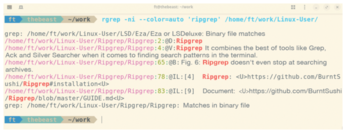
in the shell configuration (this is usually done in the .bashrc file). This avoids the need to specify the parameter each time you run the command. Ripgrep and its offshoot ripgrep-all [6] support more file formats than the original grep.
Clapgrep implements Ripgrep with an intuitive GUI for users who are not comfortable with the command line. Clapgrep's clear-cut GUI (Figure 3) offers only a few optional settings. You can limit the maximum number of search results and enable integration with Gnome's Nautilus file manager. Speaking of Gnome, Clapgrep is based on the GTK 4 GUI toolkit and the Libadwaita [7] Gnome design library, but it also meshes well with Qt-based desktops such as Plasma.
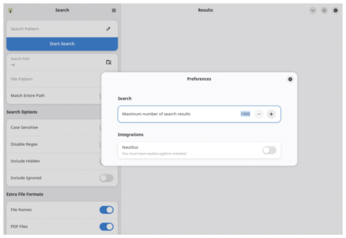
Defining a search query is very easy. Just enter the desired text or regular expression at the top in the search dialog box. As the search path, navigate to the folder you want Clapgrep to search. The file search dialog box has a filter for file names or file types to narrow down the search to specific files such as .txt or .pdf, boosting the search's efficiency and precision. In addition, you can include or exclude file names, PDFs, and Office files at the bottom. Figure 4 shows the results of a search for linux.
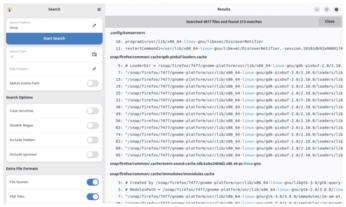
The GUI displays the search results clearly and provides more information than the command-line tools. However, only UTF-8 is currently implemented cleanly for encoding. Work on support for other encoding types for Ripgrep is already in progress, which will then also work in Clapgrep.
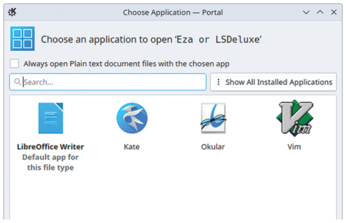
In Figure 4, the application searched through 4,817 files and found the search term, linux, 213 times. Another advantage of Clapgrep becomes apparent when you click on the search terms highlighted in blue in the results. Clapgrep then offers to open the corresponding match directly and suggests several applications to help you do this (Figure 5).
Buy this article as PDF
(incl. VAT)
Buy Linux Magazine
Subscribe to our Linux Newsletters
Find Linux and Open Source Jobs
Subscribe to our ADMIN Newsletters
Support Our Work
Linux Magazine content is made possible with support from readers like you. Please consider contributing when you’ve found an article to be beneficial.

News
-
It’s Time to Test Fedora 45 Beta
Fedora 45 beta has been released with updated Gnome, KDE Plasma, and kernel.
-
Ubuntu Stonking Stingray Gets Even Rustier
Ubuntu 26.10 has completed its migration to the Rust-based coreutils.
-
AI Fixes Linux Bottlenecks Using “Hideous” Code
A Linux developer used AI to fix bottlenecks that caused problems when building the kernel. The resulting AI-generated code needed a lot of work.
-
Advanced Video Coding Still Under Patent
Brazilian patent BRPI0109962B1 has expired, which means that DivX and Xvid are no longer problematic for Linux, but it doesn’t mean that video is all of a sudden fully unleashed.
-
2,000 Vulnerabilities per Linux Release
Thanks to AI bug hunters, the Linux kernel is seeing record numbers of vulnerabilities, and it's overwhelming developers.
-
Linux Exempt from California’s Age Verification Law
So long as Linux is distributed under the GPL, MIT, BSD, and Apache licenses, the OS is exempt from being required to verify the age of its users in California.
-
Roll Out the Cake: Linux Turns 35
35 years ago, a Finnish student began a humble project that would forever change the course of technology.
-
China Switching from Windows to Linux
China has ordered several government agencies to drop a Chinese-developed version of Windows 10 in favor of either KylinOS or UOS.
-
Pine64 Halts Production of Linux Devices
With continued DRAM and eMMC shortages, Pine64 has decided to discontinue production of Linux devices.
-
The Bullet-Proof KDE Software Initiative Is Coming
KDE, Techpaladin, and Kubuntu Focus have announced a new initiative that will provide at least three years of support for KDE Plasma 6.6 LTS and related software.