


Using Bitbucket and GitHub for Note-Taking as Writing Tools

Productivity Sauce
Both Bitbucket and GitHub feature built-in editors which can be used for creating and editing files. This feature can come in handy when you need to quickly jot down a note, draft an article, or save a text snippet. GitHub's editor is particularly suitable for writing and note-taking, as it supports soft wrap and the zen mode which provides a distraction-free writing environment. Bitbucket's editor doesn't offer any of these nice touches, but the service lets you maintain private repositories free of charge. So Bitbucket makes a better choice if you want to keep your scribbles private without spending money.
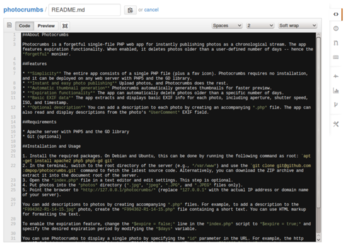
Using GitHub's and Bitbucket's built-in editors for note-taking is rather straightforward. To keep things tidy, you might want to set up a separate repository for your scribbles. Once you've done that, you can create a new text file and open it for editing. To do this on GitHub, click on the dedicated button which opens an empty file in the editor (see the Creating files on GitHub article for further info). You can then edit the file to your heart's content. You can edit existing files, too. In the repository, click on the file you want to edit, then press theEdit button. Working with files on Bitbucket is equally easy. Press the New file button to create a new file and open it in the editor. To edit an existing file, click on it, then press the Edit button.
comments powered by DisqusSubscribe to our Linux Newsletters
Find Linux and Open Source Jobs
Subscribe to our ADMIN Newsletters
Support Our Work
Linux Magazine content is made possible with support from readers like you. Please consider contributing when you’ve found an article to be beneficial.

News
-
Linux Mint 27 Set for a Christmas Release
The developers behind Linux Mint have announced a Christmas release, and it looks like Santa's sack will be brimming with features.
-
Is Linus Torvalds Vibe Coding?
The creator of Linux has added AI into his process for Linux kernel development, and it's more than just for debugging.
-
openKylin 3.0 Released with Expanded AI Integration
The latest release features a pre-installed AI agent to help perform tasks.
-
DigitalOcean Ends Open Source Credits Program
In a change that has surprised many open source developers, DigitalOcean has decided to sunset its Open Source Credits Program.
-
Office 365 Available for Testing on Linux via Bottles
Linux users can now test the official Office 365, thanks to Mirko Brombin's work on Bottles.
-
Dutch Government Turns to Open Source for Digital Sovereignty
Following in the footsteps of other European countries, the Netherlands is looking to increase its sovereign digital infrastructure with open source software.
-
Linux May Soon Work on Snapdragon X2-Based PCs
If you're thinking about buying a Snapdragon X2-based desktop or laptop, Linux may soon be an option.
-
KDE for People Initiative Calls for AI Ban in Plasma
A new community of KDE wants the project to adopt a strict no-AI policy for KDE Plasma.
-
KDE Sets Ambitious Goals for 2026 and Beyond
KDE Connect reveals the goals for the Linux desktop darling, with one of those goals long overdue.
-
It’s Time to Test Fedora 45 Beta
Fedora 45 beta has been released with updated Gnome, KDE Plasma, and kernel.