


Setting up a home desktop system with FreeBSD
Running Linux Software
As Linux and BSD are both Unix-style operating systems, nearly all of the common applications that run on Linux have a FreeBSD version. The exceptions are in the area of proprietary software. FreeBSD has a Linux compatibility layer, but simply enabling it is unlikely to be sufficient to run the majority of larger Linux applications. In many cases, you'll need to install a small chroot environment containing a mini Linux installation, and this requires quite a lot of BSD expertise to get working.
However, don't despair – most of the large applications that you're likely to need have wrapper scripts to handle the installation. Google Chrome, for example, has no native FreeBSD build, but you can install it using the browser installation script (see the box entitled "Chrome vs. Chromium"). One snag I encountered is that the browser installation script is no longer in the repository, so I had to visit its GitHub page [3].
Chrome vs. Chromium
Although no native version of Chrome exists for FreeBSD, you can find a version of Chromium in the FreeBSD repository. The Chromium browser looks and works in a way that is very similar to Chrome, but unfortunately, Chromium can't synchronize to a Google account, meaning that password and settings synchronization won't work. Chromium also can't run DRM-protected content on sites such as Netflix. The fully open source Firefox version installed from the FreeBSD repository has the same problem, even though sites such as Netflix do work when running Firefox under Linux. The whole situation is ironic because, although Netflix famously uses FreeBSD for its streaming servers, there is no official way to view Netflix on FreeBSD.
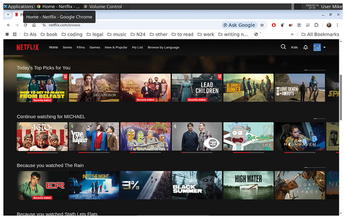
I ran the script, and it was obvious from the terminal output that the script was doing a great deal of work and pulling through a lot of files to set up a suitable environment. Having run the script and let it run its course, I ended up with a Chrome icon in Xfce4's launcher application, but it didn't run until I had reset the machine. Once I launched it, Chrome ran like it does on Linux, and I could log into my Google account for synchronization. I was able to log into Netflix and play content (see Figure 6).
I had less luck getting the Steam installation script running. It did run and pull through some files, but Steam itself never worked. I have a feeling that it might have been possible to get it running with enough research.
Conclusion and Reflections
Building a desktop system on FreeBSD is a great way to learn about the BSD environment, but if you're looking for a shortcut, you might explore the GhostBSD variant, which is based on FreeBSD but comes with the MATE desktop pre-installed and offers Xfce as a community-based variant.
My experience with Steam on FreeBSD, I feel, highlights a problem with relying on Linux emulation for major applications under FreeBSD: If the wrapper script breaks, you can find yourself stuck until someone makes an updated script. I'd be reluctant to rely on this mechanism for running applications that are critical to my workflow. It's an ironic situation, as for most of its life, the Linux desktop was the one that had to rely on tricks and workarounds to get mainstream software to run. Thankfully, over the last decade, many software developers and organizations have awakened to the advantages of supporting a cross-platform or cloud-based approach.
I'll make a controversial point as there's another irony here – if anything, FreeBSD is more consistent and reliable than Linux because it hasn't fractured into an ecosystem of incompatible distributions. For embedded work or even server applications, FreeBSD has its advantages. For building a general purpose desktop (the subject that I've examined in this case), it's closer to what Linux had to offer 10 or 15 years ago as a desktop operating system. It can handle the basics, despite a few rough edges compared to modern Linux, but you might hit some brick walls when you need to interact with proprietary technology.
Infos
- Free software definition: https://www.gnu.org/philosophy/free-sw.en.html
- FreeBSD website: https://www.freebsd.org/
- Linux browser wrapper script: https://github.com/mrclksr/linux-browser-installer
The Author

Michael Reed bounced around between platforms such as the BBC Micro, RISC OS, Commodore Amiga, DOS, IBM OS/2, and Microsoft Windows before he made a home for himself in the world of Linux in the late '90s.
« Previous 1 2 3 4
Buy this article as PDF
(incl. VAT)
Buy Linux Magazine
Subscribe to our Linux Newsletters
Find Linux and Open Source Jobs
Subscribe to our ADMIN Newsletters
Support Our Work
Linux Magazine content is made possible with support from readers like you. Please consider contributing when you’ve found an article to be beneficial.

News
-
Dutch Government Turns to Open Source for Digital Sovereignty
Following in the footsteps of European countries, the Netherlands is looking to increase its sovereign digital infrastructure with open source software.
-
Linux May Soon Work on Snapdragon X2-Based PCs
If you're thinking about buying a Snapdragon X2-based desktop or laptop, Linux may soon be an option.
-
KDE for People Initiative Calls for AI Ban in Plasma
A new community of KDE wants the project to adopt a strict no-AI policy for KDE Plasma.
-
KDE Sets Ambitious Goals for 2026 and Beyond
KDE Connect reveals the goals for the Linux desktop darling, with one of those goals long overdue.
-
It’s Time to Test Fedora 45 Beta
Fedora 45 beta has been released with updated Gnome, KDE Plasma, and kernel.
-
Ubuntu Stonking Stingray Gets Even Rustier
Ubuntu 26.10 has completed its migration to the Rust-based coreutils.
-
AI Fixes Linux Bottlenecks Using “Hideous” Code
A Linux developer used AI to fix bottlenecks that caused problems when building the kernel. The resulting AI-generated code needed a lot of work.
-
Advanced Video Coding Still Under Patent
Brazilian patent BRPI0109962B1 has expired, which means that DivX and Xvid are no longer problematic for Linux, but it doesn’t mean that video is all of a sudden fully unleashed.
-
2,000 Vulnerabilities per Linux Release
Thanks to AI bug hunters, the Linux kernel is seeing record numbers of vulnerabilities, and it's overwhelming developers.
-
Linux Exempt from California’s Age Verification Law
So long as Linux is distributed under the GPL, MIT, BSD, and Apache licenses, the OS is exempt from being required to verify the age of its users in California.