


Mitigating SSH brute-force threats on Linux systems
Visualizing SSH Access
If you want a live dashboard of SSH traffic, use logtop [9]. It shows a real-time count of IPs hitting your SSH server (Figure 6):
sudo apt install logtop
sudo tail -F /var/log/auth.log | logtop
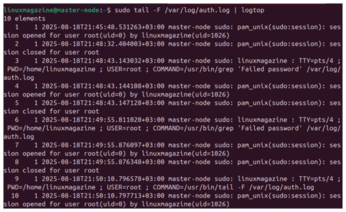
For web-based visual dashboards, GoAccess [10] works well when used with logs parsed through a custom filter. While GoAccess is typically used for web logs, it can be adapted to show SSH trends with some log formatting.
Command-Level Tracking
For deeper visibility, install the Linux Audit Daemon (auditd) [11], which lets you log exactly what users do after connecting, including command usage and file access.
You can install auditd with
sudo apt install auditd audispd-plugins
To track all executed commands, use
sudo auditctl -a always,exit -F arch=b64 -S execve
Logs will appear in /var/log/audit/audit.log. Use ausearch and aureport to filter data.
You can also track file access with
sudo auditctl -w /etc/ssh/sshd_config -p wa -k ssh_config_watch
This alerts you to any changes to the SSH configuration file, even by root.
Final Checklist
Rate-limiting SSH traffic with iptables or ufw is a simple yet effective way to slow down attackers. Port knocking takes it a step further by hiding your SSH service entirely unless the right knock is received.
Combined with key authentication and tools like Fail2ban, these techniques form a layered defense strategy that can stop both casual bots and targeted brute-force attempts. Here's a summary checklist:
- Disable password logins and enforce key-only authentication
- Use Fail2ban to automatically block repeated failures
- Rate-limit login attempts using iptables or ufw
- Hide SSH using
knockdand port knocking - Regularly review logs in
/var/log/auth.logorsecure - Set up daily reports with Logwatch
- Enable real-time alerts using Logcheck or
swatch - Use
auditdto log command-level activity - Visualize access trends with
logtopor dashboards
SSH is a powerful and flexible tool, but it's also a common target for attacks. Fortunately, Linux gives administrators all the tools they need to defend against brute-force attempts.
With the strategies covered in this article, from authentication hardening and firewall tuning to log-based detection and command auditing, you can turn SSH from a vulnerable gateway into a hardened fortress.
Infos
- Fail2ban: https://github.com/fail2ban/fail2ban
- iptables: https://linux.die.net/man/8/iptables
- nftables: https://wiki.archlinux.org/title/Nftables
- ufw: https://wiki.archlinux.org/title/Uncomplicated_Firewall
- knockd: https://linux.die.net/man/1/knockd
- Logwatch: https://sourceforge.net/projects/logwatch
- Logcheck: https://logcheck.org/
- swatchdog: https://github.com/ToddAtkins/swatchdog
- logtop: https://manpages.ubuntu.com/manpages/plucky/man1/logtop.1.html
- GoAccess: https://goaccess.io/
- auditd: https://linux.die.net/man/8/auditd
The Author

Neville Ondara is a systems engineer and Linux enthusiast who enjoys demystifying security tools and writing about real-world defensive strategies.
« Previous 1 2 3 4
Buy this article as PDF
(incl. VAT)
Buy Linux Magazine
Subscribe to our Linux Newsletters
Find Linux and Open Source Jobs
Subscribe to our ADMIN Newsletters
Support Our Work
Linux Magazine content is made possible with support from readers like you. Please consider contributing when you’ve found an article to be beneficial.

News
-
Is AI Coming to Your Ubuntu Desktop?
According to the VP of Engineering at Canonical, AI could soon be added to the Ubuntu desktop distribution.
-
Framework Laptop 13 Pro Competes with the Best
Framework has released what might be considered the MacBook of Linux devices.
-
The Latest CachyOS Features Supercharged Kernel
The latest release of CachyOS brings with it an enhanced version of the latest Linux kernel.
-
Kernel 7.0 Is a Bit More Rusty
Linux kernel 7.0 has been released for general availability, with Rust finally getting its due.
-
France Says "Au Revoir" to Microsoft
In a move that should surprise no one, France announced plans to reduce its reliance on US technology, and Microsoft Windows is the first to get the boot.
-
CIQ Releases Compatibility Catalog for Rocky Linux
The company behind Rocky Linux is making an open catalog available to developers, hobbyists, and other contributors, so they can verify and publish compatibility with the CIQ lineup.
-
KDE Gets Some Resuscitation
KDE is bringing back two themes that vanished a few years ago, putting a bit more air under its wings.
-
Ubuntu 26.04 Beta Arrives with Some Surprises
Ubuntu 26.04 is almost here, but the beta version has been released, and it might surprise some people.
-
Ubuntu MATE Dev Leaving After 12 years
Martin Wimpress, the maintainer of Ubuntu MATE, is now searching for his successor. Are you the next in line?
-
Kali Linux Waxes Nostalgic with BackTrack Mode
For those who've used Kali Linux since its inception, the changes with the new release are sure to put a smile on your face.