


Comparing Video Codecs AV1 and VVC
Benchmarks
Benchmarks for comparing the two codecs are still quite complex at present. Because VVC is relatively new on Linux, you need to build the libvvenc library from source and then compile it into FFmpeg. However, FFmpeg has steadfastly refused to integrate the library in Debian. Ubuntu 25.10 already provides an updated FFmpeg version, but it cannot use libvvenc either. Consequently, I developed a script using ChatGPT that allows comparison of both codecs and displays the results graphically.
I used an excerpt from the freely available Blender movie Big Buck Bunny [7] as my source material. I processed the same short clip consisting of 300 frames with both AV1 and VVC. It was impossible to overlook the fact that VVC took about 4.7 times longer than AV1 to process the same clip under identical conditions.
For AV1, the script uses the libaom reference library and Opus for the audio track (Figure 1). The approximately 10-second sequence resulted in a WebM format with a file size of 4.8MB and a bitrate of 2400kbit/s. For VVC, the script used the libvvenc library (Figure 2), which produced a video with a size of just 640KB at the same bitrate. The file generated by AV1 is 7.5 times larger than the one generated by VVC. However, VVC also takes almost five times as long.
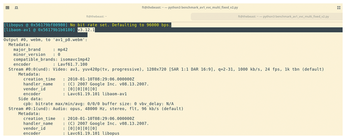
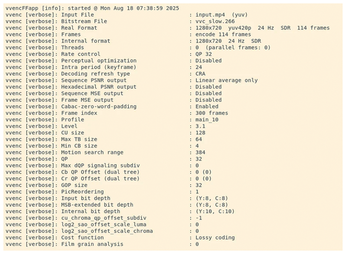
Figure 3 shows the various presets used. In AV1, the AV1-4 and AV1-8 presets are a tradeoff between encoding speed and video quality. AV1-4 is relatively slow and aims to achieve very high quality and strong compression with a small file size. AV1-8 works significantly faster, but with less efficient compression and slightly lower quality. The file size is sometimes larger than with the slower presets, but the computing time is greatly reduced.
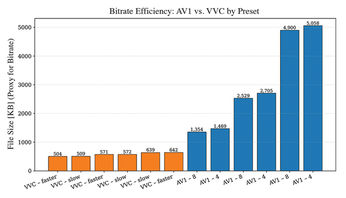
For VVC, I used the slower and faster presets. The slower variant focuses on quality and compression efficiency. The encoder uses more complex algorithms and searches through larger areas of the image, which significantly slows down processing, but ensures the best possible quality and smallest file size. The faster preset is optimized for maximum speed. The encoder uses less complex methods and significantly reduces the number of compute steps. This reduces the time required, but compression efficiency suffers a little, and the video file is larger and of slightly lower quality.
Figure 3 shows that VVC produces significantly smaller files than AV1 in all variants. While the VVC-encoded clips in the test were mostly around 600KB in size, the corresponding AV1 versions were 1300KB and 5000KB in size. VVC is therefore two to eight times more efficient than AV1 at comparable image quality. In practical terms, this means that VVC allows videos of the same quality to be stored in a far more space-saving manner and streamed at a lower data rate. The price for this, in addition to the license fees, is more computational load during encoding, which is often only worthwhile for professional video productions and streaming services.
Conclusions
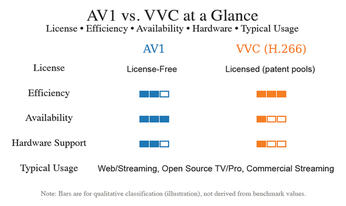
AV1 is the natural ally for Linux and open source in particular: license-free, implemented as open source, and without legal uncertainties. AV1-encoded media consumes more bandwidth when streaming due to larger file sizes, but it saves you from licensing fees, which is why organizations such as Google, Netflix, and Amazon prefer to use AV1. You'll find VCC used more often in applications such as broadcasting, professional media production, or ultra-high-end applications, where license fees are already factored in. To help you decide which codec meets your needs, Figure 4 provides a cheat sheet for comparing AV1 and VVC.
Infos
- AV1: https://aomedia.org/specifications/av1/
- VVC: https://www.hhi.fraunhofer.de/en/departments/vca/technologies-and-solutions/h266-vvc/vvc-overview.html
- VVdeC: https://github.com/fraunhoferhhi/vvdec
- Elmedia Player: https://www.elmedia-video-player.com
- Intel VCC decoding: https://www.intel.com/content/www/us/en/products/sku/240960/intel-core-ultra-5-processor-226v-8m-cache-up-to-4-50-ghz/specifications.html
- Real-time decoder from Sharp: https://global.sharp/corporate/news/201204-a.html
- Big Buck Bunny: https://en.wikipedia.org/wiki/Big_Buck_Bunny
« Previous 1 2
Buy this article as PDF
(incl. VAT)
Buy Linux Magazine
Subscribe to our Linux Newsletters
Find Linux and Open Source Jobs
Subscribe to our ADMIN Newsletters
Support Our Work
Linux Magazine content is made possible with support from readers like you. Please consider contributing when you’ve found an article to be beneficial.

News
-
Alpine Linux 3.24 Features Fresh Desktops and a Newer Kernel
If you're a fan of Alpine Linux, it's time to upgrade because the latest version has been released with KDE Plasma 6.6, Gnome 50, and Linux kernel 6.18 LTS.
-
EU Open Source Strategy Plays Key Role in Tech Sovereignty Package
Comprehensive measures adopted by the European Commission aim to reduce dependency on non-EU countries.
-
Linux Foundation Report Indicates AI Driving Tech Hiring
Within growing security and skills gaps, AI has been found to be a positive driving force behind tech hiring trends in Europe.
-
United Nations Open Source Portal Goes Live
A new open source portal seeks to coordinate and scale open source efforts across the United Nations system.
-
KDE Linux Drops AUR
KDE Linux developers have dropped the Arch User Repository from the build pipeline due to security concerns; other distributions should consider doing the same.
-
California May Exempt Linux from Its Age-Verification Law
After backlash from the Linux community, California may be backing off on its promise to force all operating systems to verify age, but one platform may still have to comply.
-
Another Logic Bug Found in Linux Kernel
Qualys has discovered a vulnerability in the Linux kernel that can be used to elevate standard user privileges.
-
Ubuntu Core 26 Offers Game-Changing Enterprise Features
Ubuntu Core 26 could be a game-changer for organizations looking for increased security and reliability.
-
AI Flooding the Linux Kernel Security Mailing List
AI is giving Linus Torvalds a headache, but not in the way you might think.
-
Top Priorities for Open Source Pros Seeking a New Job
Professional fulfillment tops the list, according to LPI report.