


Filesystem Searching with Clapgrep and Recoll
Recoll as an Alternative
Recoll [8] is an alternative to Clapgrep that also features a GUI. Unlike Clapgrep, Recoll relies on an index and therefore does not have to search the filesystem on subsequent calls once the index has been created. It is a good idea to create the index at night when your computer is not in use. Even on a system with AMD Ryzen 9 7900 and 64GB RAM, indexing my home directory took almost 20 minutes.
Recoll uses the Xapian [9] open source library as a storage and retrieval engine in the background. Xapian manages the index database, processes complex queries, and calculates relevance, while Recoll (Figure 6) provides mechanisms and interfaces for indexing document content and processing and presenting various file formats.
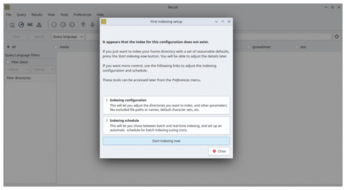
According to information available on the Internet, Recoll's index gives it a speed advantage when searching in very large directories or frequently searched file collections. I was unable to verify this on state-of-the-art hardware where I used Clapgrep and Recoll to search for the term "linux" in the /usr directory, containing just south of 34,000 files. In Recoll, I entered the expression "linux and path:/usr/" in the search line. In both cases, the result was available in less than a blink of an eye. However, Recoll is likely to have an advantage in far larger directories with millions of files.
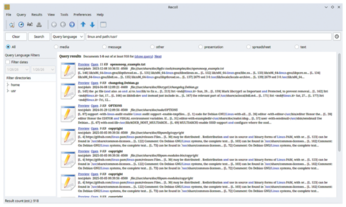
Recoll appears to be significantly more powerful when evaluating search results. The display (Figure 7) also appears more clear-cut, delivering the results page by page. In addition to Linux, Recoll is currently available for macOS, Windows, and Android. It searches files, email attachments, and archives, which it decompresses transparently.
Besides Recoll's command line or GUI, you can also use a web interface. Recoll is recommended for search queries that require complex search functions and a detailed display and evaluation of the results. It supports a powerful query language with Boolean operators, phrase search, wildcards, and filtering by file attributes such as size, date, or MIME type.
Conclusion
Clapgrep and Recoll both have their merits; neither is better than the other. However, they are intended for different types of file system searches. For occasional quick searches, Clapgrep has the edge and offers several advantages over the veteran grep and its descendants Ripgrep and ripgrep-all. When it comes to complex or repetitive searches whose results need to be evaluated based on various criteria, Recoll is the clear winner. You will also find an overview of other desktop search engines in an earlier issue of Linux Magazine [10][11].
Infos
- find: https://man7.org/linux/man-pages/man1/find.1.html
- grep: https://man7.org/linux/man-pages/man1/grep.1.html
- Clapgrep Flatpak: https://flathub.org/apps/de.leopoldluley.Clapgrep
- Clapgrep source code: https://github.com/luleyleo/clapgrep/releases/tag/v25.07
- "Accelerated and targeted search and find with Ripgrep" by Ferdinand Thommes, ADMIN, issue 78, 2023, p.92, https://www.admin-magazine.com/Archive/2023/78/Accelerated-and-targeted-search-and-find-with-Ripgrep
- ripgrep-all: https://github.com/phiresky/ripgrep-all
- Libadwaita: https://en.wikipedia.org/wiki/Adwaita_(design_language)#Libadwaita
- Recoll: https://www.recoll.org/
- Xapian: https://xapian.org/
- "Three full-text desktop search engines" by Harald Jele, ADMIN, issue 66, 2021, p. 30, https://www.admin-magazine.com/Archive/2021/66/Three-full-text-desktop-search-engines
- "Safer Internet Searches" by Mats Tage Alexsson, Linux Magazine, issue 249, August 2021, https://www.linux-magazine.com/Issues/2021/249/Search-Engines
« Previous 1 2
Buy this article as PDF
(incl. VAT)
Buy Linux Magazine
Subscribe to our Linux Newsletters
Find Linux and Open Source Jobs
Subscribe to our ADMIN Newsletters
Support Our Work
Linux Magazine content is made possible with support from readers like you. Please consider contributing when you’ve found an article to be beneficial.

News
-
AI Fixes Linux Bottlenecks Using “Hideous” Code
A Linux developer used AI to fix bottlenecks that caused problems when building the kernel. The resulting AI-generated code needed a lot of work.
-
Advanced Video Coding Still Under Patent
Brazilian patent BRPI0109962B1 has expired, which means that DivX and Xvid are no longer problematic for Linux, but it doesn’t mean that video is all of a sudden fully unleashed.
-
2,000 Vulnerabilities per Linux Release
Thanks to AI bug hunters, the Linux kernel is seeing record numbers of vulnerabilities, and it's overwhelming developers.
-
Linux Exempt from California’s Age Verification Law
So long as Linux is distributed under the GPL, MIT, BSD, and Apache licenses, the OS is exempt from being required to verify the age of its users in California.
-
Roll Out the Cake: Linux Turns 35
35 years ago, a Finnish student began a humble project that would forever change the course of technology.
-
China Switching from Windows to Linux
China has ordered several government agencies to drop a Chinese-developed version of Windows 10 in favor of either KylinOS or UOS.
-
Pine64 Halts Production of Linux Devices
With continued DRAM and eMMC shortages, Pine64 has decided to discontinue production of Linux devices.
-
The Bullet-Proof KDE Software Initiative Is Coming
KDE, Techpaladin, and Kubuntu Focus have announced a new initiative that will provide at least three years of support for KDE Plasma 6.6 LTS and related software.
-
Linux Mint Shares a Possible Kernel Cleanup Solution
For those on Linux Mint who like to keep multiple kernels around but don't want them to take up too much space, you might be getting a new automated tool.
-
CachyOS Gets an Update
CachyOS August 2026 release is now available with the latest version of KDE, some new features, and plenty of improvements.