


Is the Ghost CMS Ready to Replace WordPress?

Ghost Web

Lead Image © Katrin Bpunkt, photocase.com
Ghost is a powerful CMS for beginners and professionals who want to grow a business around their content.
WordPress [1] is a super-popular solution for blogs and websites, and it doesn't need any special introduction. According to the official WordPress.com website, 42 percent of the entire web is built using WordPress! Due to WordPress's popularity, it's easy to find guides, tutorials, code examples, and ready solutions for common issues. In January 2025, however, Automattic Inc. [2], the top WordPress contributor company, lowered its investment in WordPress to about 45 hours per week, focusing mostly on security and critical updates. Another major issue is the programming language PHP, which WordPress is written in and which is actively losing popularity these days. WordPress security isn't the project's strongest point either – there have been many security incidents in the project core and third-party plugins.
Some users who are looking for a WordPress alternative are turning to Ghost [3]. The Ghost blogging platform supports comments and statistics. It has its own open source API and supports native discovery, distribution, and interaction across Ghost, Bluesky, Threads, Mastodon, Flipboard, WordPress, WriteFreely, and Surf. Ghost also supports multiple payment systems that allow users to create special content for their biggest fans. Rich media features let users attach YouTube videos, Spotify music tracks, and other multimedia content to a blog post with one click. You can self-host Ghost with the open source version, or you can purchase the Pro version, in which case the Ghost team will handle all setup. See the box entitled "Reasons to Choose Ghost over WordPress" for more on Ghost benefits.
Reasons to Choose Ghost over WordPress
Ghost is minimalist and user-friendly. I'll take the risk of saying that, in my opinion, the Ghost editor is good – much better than the WordPress editor. It supports Markdown and cards – very simple content import tools for websites like YouTube videos or Unsplash images. A huge advantage is that there aren't tons of buttons on the top and left side of the editor page with font features and styles. There's only a page title with content area, and a "plus" button to add content in any supported format.
Other Ghost advantages include:
- Website members (free and paid), newsletters, free and paid content, and website income are well connected in the Ghost Dashboard tool, which provides useful information about website progress
- Performance – Ghost is written in JavaScript and uses the Node.js platform, which gives it a performance advantage over the PHP-based WordPress
- Flexible design – Ghost default themes are heavily customizable and allow you to adjust the color palette for optimum compatibility with a brand, project, or organization style.
- Easy migration – you can export the website configuration and a list of members to a JSON file; a special command-line tool called
ghost backupgenerates a ZIP archive with all website data inside - Good search engine optimization (SEO) out of the box – Ghost supports sensible SEO metatags and allows users to change them for each post
- Built-in website analytics, without any third-party plugins
- Multiple payment systems support: Stripe, PayPal, Patreon, Alipay, Apple Pay, Google Pay, and more
Ghost also provides a powerful open source API with detailed documentation.
More on Ghost
The Ghost story began in April 2013, thanks to two cofounders: John O'Nolan and Hannah Wolfe. Their goal was to create the best open source tools for independent journalists and writers that would have a real impact on online media. At that time, it was a bold dream because WordPress was already very popular back then.
Ghost is written in JavaScript and uses the popular server platform Node.js. The code is released under the MIT license, which allows for code reuse with proprietary software. Other important components include Koenig [4], Ghost's editor; Ghost CLI [5], a tool for installing and updating Ghost; and GCTools [6], command-line utilities for working with Ghost content. GCTools is capable of editing Ghost content in bulk: adding or removing authors, changing post or page visibility, editing tags or templates, setting feature images, and more. This bulk editing capability is useful for websites with hundreds or thousands of posts and pages.
Ghost targets many users these days, including personal bloggers, large teams of writers, organizations, musicians, artists, and other creators. With more than 100,000,000 installations [7], who collectively have earned over $100 million in revenue [8], Ghost has achieved remarkable success. The basic Ghost principle is similar to early WordPress: small, compact, and powerful project code with many extensions and extra functionality.
Ghost is operated as a nonprofit foundation with a pledge to prioritize user interests over those of shareholders or investors. This information is clearly stated on the official website. The Ghost legal constitution prohibits the sale or purchase of the company and ensures that 100 percent of the revenue will be invested in Ghost and its related products and community. This is a very interesting and unusual business approach, and it's not the only interesting thing about Ghost! All company data, including finances, is public. Ghost Pro generates revenue that is invested in developers, managers, community members, and product promotion.
The Ghost Pro subscription is based on audience size: $15/month for 1,000 members, $46 for 2,500 members, $63 for 5,000 members, and $274 for 100,000 members. The top plan for businesses is also available for $399. This is a bit costly, especially for small websites and beginner creators. However, businesses with a wide audience should be able to afford the most expensive plans. These plans have many limitations, but the following are worth highlighting: file size uploads are limited to 5MB in the cheapest plan, which is a good quality photo size these days. The Business plan ($399) has a 250MB size limit, which looks distinctly weird! Another strange thing about the pricing is that single sign-on (SSO) isn't available even in the business plan. It's only available in the custom plan, where the price is negotiated with the Ghost sales team. Ghost can definitely surprise its users and customers, and not always in a positive way.
Users who don't want to pay for the Ghost Pro subscription have the option of self-hosting. It's not difficult to install Ghost on a virtual machine or even a small home server. You can set up Ghost with the Ghost CLI installer or using a Docker container. The official CLI installer officially only supports Ubuntu, but it will probably also work on other Debian Linux derivatives. Ghost CLI also supports backups and Ghost instance updates.
Installing Ghost
Ghost hardware requirements are simple: a Linux operating system (Ubuntu is recommended) and at least 1GB of RAM. Ghost also works well with 512MB of RAM – I have tested this personally several times. Ghost developers recommend Ubuntu Server for self-hosting. There is also a Docker container installation option and a local installation that supports Linux, Windows, and macOS. Finally, you can install from source code. See Listing 1 for details.
Listing 1
Intalling Ghost
# Option 1 - Ubuntu Server, good for production
# Prerequisites: Ubuntu 22.04 or Ubuntu 24.04, Nginx 1.9.5 or
# newer, Node.js 22, MySQL 8, a registered domain name with
# correct DNS A record with server IP
# New user setup, ghost username isn't recommended due to collision issues, so gh-user is good choice:
$ sudo usermod -aG sudo <user>
$ su - gh-user
# Install Ghost dependencies using package manager
$ sudo apt-get update && sudo apt-get upgrade
$ sudo apt-get install nginx
# firewall allows HTTP(S) connections
$ sudo ufw allow 'Nginx Full'
# MySQL DB setup
$ sudo apt-get install mysql-server
# Enter Mysql shell
$ mysql
# Update permissions
$ ALTER USER 'root'@'localhost' IDENTIFIED WITH \
 'mysql_native_password' BY '<Your-New-Root-Password>';
# Re-read permissions
$ FLUSH PRIVILEGES;
$ exit # exit from Mysql shell
# Node.js installation - skip it if Node.js 22 is already installed
# Nodesource repository setup
$ sudo apt-get update && sudo apt-get install -y \ca-certificates curl gnupg
$ sudo mkdir -p /etc/apt/keyrings && NODE_MAJOR=22
$ U=https://deb.nodesource.com/gpgkey/nodesource-repo
$ curl -fsSL "$U".gpg.key | \
  sudo gpg --dearmor -o /etc/apt/keyrings/nodesource.gpg
$ echo "deb [signed-by=/etc/apt/keyrings/nodesource.gpg] \
  https://deb.nodesource.com/node_$NODE_MAJOR.x \
  nodistro main" | \
  sudo tee /etc/apt/sources.list.d/nodesource.list
$ sudo apt-get update && sudo apt-get install nodejs -y
# Using Ghost-CLI tool
$ sudo npm install ghost-cli@latest -g
# sitename can be changed to any real domain like example.com
$ sudo mkdir -p /var/www/sitename
$ sudo chown gh-user:gh-user /var/www/sitename
$ sudo chmod 775 /var/www/sitename
$ cd /var/www/sitename && ghost install
# Then answer installer questions: enter website URL with HTTP
# or HTTPS, MySQL hostname, username / password, Ghost database
# name, set up a Ghost MySQL user, NGINX (auto mode is
# available), SSL setup, the systemd service autostart and on
# the final question - "Start Ghost" - choose yes.
# Option 2 - Docker container, the most universal and
# user-friendly way, ideal choice for beginners
# Prerequisites: domain name with a valid DNS A record and
#  Docker 20.10.13 or newer.
# Install Docker for Debian, Ubuntu and derivatives:
# apt update && apt install docker.io
# Install Docker for Red Hat Enterprise Linux and derivatives:
# dnf install docker
# Docker installation instructions Fedora, CentOS, Raspberry Pi
# OS, and SLED can be found here: [9].
# Clone the official Github repository
$ git clone https://github.com/TryGhost/ghost-docker.git \
  /opt/ghost
# Copy the Ghost and Caddy webserver configuration files
$ cd /opt/ghost && cp caddy/Caddyfile.example caddy/Caddyfile
$ cp .env.example .env && vi .env
# now, the following parameters should be changed:
# DOMAIN - your custom domain e.g. mysite.com
# ADMIN_DOMAIN - Optional a separate domain for admin page
# e.g. admin.mysite.com
# DATABASE_PASSWORD and DATABASE_ROOT_PASSWORD -
# generates random DB passwords
# SMTP Email Section - add the mail section to
# config.production.json. It can be Mailgun, Gmail or any
# free or paid SMTP service. The example looks like this:
"mail": {
  "transport": "SMTP",
  "options": {
    "service": "Mailgun",
    "host": "smtp.mailgun.org",
    "port": 465,
    "secure": true,
    "auth": {
      "user": "postmaster@example.mailgun.org",
      "pass": "your-mailgun-password" } }   }
# Optional - Caddy domain setup
$ vi caddy/Caddyfile
# For example.com type domains: set DNS for example.com and
# admin.example.com domains and uncomment "Redirect www ->
# root domain" section.
# For www.example.com type domains: redirect example.com
# to www.example.com using CNAME DNS record, then uncomment
# the "Redirect root -> www domain" section and set
# CHANGE_ME option to example.com .
# Run Ghost using Docker
# The below commands usually takes few minutes to complete:
# docker compose pull && docker compose up -d
# Now open the website and its admin panel:
$ xdg-open https://YOUR-GHOST-DOMAIN.com
$ xdg-open https://YOUR-GHOST-DOMAIN.com/ghost
# Congratulations!
# Optional - Web analytics setup
# Go to Tinybird [10] website and create the account there and
# enter the credentials to below:
$ sudo docker compose run --rm tinybird-login
# Copy the Tinybird schema files from the Ghost container into
# a shared volume, then exit.
$ sudo docker compose run --rm tinybird-sync
# Deploy the Tinybird configuration
$ sudo docker compose run --rm tinybird-deploy
# Copy tokens and final configurations and save them:
$ docker compose run --rm tinybird-login get-tokens
# Paste the above configuration into .env file
# Add analytics to the COMPOSE_PROFILES variable:
COMPOSE_PROFILES=analytics,activitypub
# Run Ghost with Web Analytics:
$ sudo docker compose pull && sudo docker compose up -d
# Then check "Analytics" section of Ghost admin page
# Optional - enable Social Web (ActivityPub)
# ActivityPub helps to discover and distribute content with
# other services like Bluesky add Threads.
# Edit .env file and add activitypub to COMPOSE_PROFILES:
COMPOSE_PROFILES=analytics,activitypub # with analytics
COMPOSE_PROFILES=activitypub # without analytics
# And uncomment the ACTIVITYPUB_TARGET line:
ACTIVITYPUB_TARGET=activitypub:8080
# Run Ghost with ActivityPub:
$ sudo  docker compose pull
$ sudo docker compose up -d --force-recreate ghost caddy
# Now "Network" section of Ghost Admin will shows up.
# Updating Ghost
# /opt/ghost is the Ghost installation directory, it can be different
$ cd /opt/ghost && git pull
$ sudo docker compose pull && sudo docker compose up -d
$ docker image prune
# After any configuration change images should be recreated:
$ docker compose up -d --force-recreate ghost caddy
# Option 3 - local install, ideal for testing and theme development
# Prerequisites - supported Node.js version, Yarn or Npm
# package manager, Python 3 and setuptools for building SQLite3.
$ npm install ghost-cli@latest -g
$ ghost install local
$ xdg-open http://localhost:2368/admin
# All done! Several useful console commands for using the local
# installation: ghost stop - stop Ghost, ghost start - to start
# it again and ghost log - show the logs. The themes are
# located in local /content/themes/ directory.
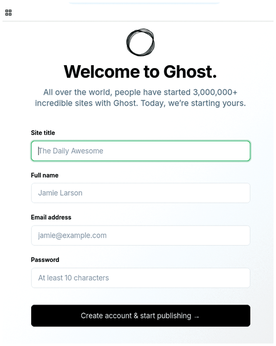
After successful installation, Ghost opens a window to ask for some basic settings, such as the new website title and the admin credentials (Figure 1).
First Look
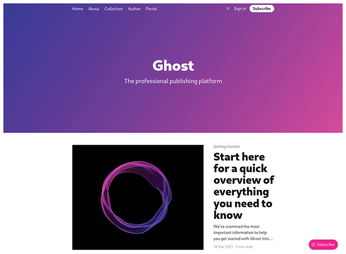
At first glance, Ghost appears to be a polished, solid product with a great, intuitive design (see Figure 2). The Ghost user interface was created by professional designers. All the most important elements have a solid size and are very readable – a user will not feel lost in a sea of content. The top navigation bar contains important pages, as well as the Sign In and Subscribe buttons. Yes, the Subscribe button is big, but it is also very important. You will also find a mosaic of post covers and titles, as well as a smaller navigation bar at the bottom. Everything is clearly located at the top of the page.
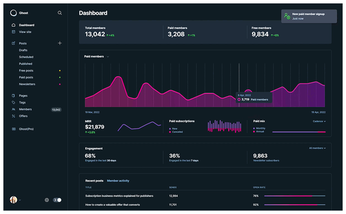
The Ghost Dashboard (on Figure 3)features an extra user-friendly design. The dashboard is split into two vertical parts. The left side contains main menu items: the link to the dashboard itself, a Posts sub-menu (Drafts, Scheduled, Already Published), Pages (static pages like /about), Tags, and Members. The pane on the right displays the content for items selected in the left menu. Notifications appear in the top-right corner.
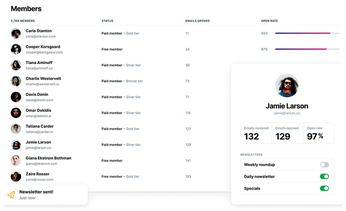
The Staff menu lets you manage user collaboration by assigning users ranks and permissions. The easiest way to do this is inviting users by email and choosing a special rank for each user. You have a choice of four ranks (from lowest to highest): Contributor, Author, Editor, Administrator. The Membership menu (Figure 4) is all about subscriptions and paid posts settings, as well as integration with third-party services. The Code Injections option lets you add custom CSS and JavaScript code into a website header and footer, creating an interactive menu or a banner. The Navigation option lets you edit top and bottom toolbars (e.g., to add a "We are on Twitch" link or to forward a link to Goodreads).
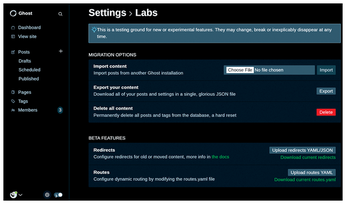
The Ghost Labs page (Figure 5) opens the door to unstable features that aren't polished enough yet but will be added to the main settings soon. The most important of these options are Redirects and Router. The Redirects feature lets you redirect from an old link to a new link. Dynamic Routing is designed to map URL patterns to data and templates (e.g., if you need to put all posts under /blog/ route in the case of a new website content focus that doesn't fit with blogging, then new content could be added to different routes like /lab, /music, etc.). The routing documentation is available online [11]. Ghost Labs also offers content export and import options. These useful options let you export or import all Ghost website settings and content into single JSON file.
Buy this article as PDF
(incl. VAT)
Buy Linux Magazine
Subscribe to our Linux Newsletters
Find Linux and Open Source Jobs
Subscribe to our ADMIN Newsletters
Support Our Work
Linux Magazine content is made possible with support from readers like you. Please consider contributing when you’ve found an article to be beneficial.

News
-
System76 Announces the New Thelio Prime Desktop
The makers of the Thelio desktop line and Pop!_OS have released a powerful small form factor PC.
-
A Must See KDE Documentary
It doesn't matter what desktop environment you prefer, this KDE documentary should top your list of things to watch.
-
New KORA Linux Distro to Harness the Power of Local AI
The development team behind CyanogenMod, Android, and Playtron unveils KORA, a Linux distribution built specifically for AI nerds.
-
Epic Games Targets Linux for New Launcher
The Epic Games new launcher is still in preview, but it looks to land on several Linux distributions.
-
Fedora 45 Now Available
The latest iteration of Fedora has arrived with Gnome 51 and KDE Plasma 6.8.
-
Linux 7.4 is "Much Healthier" Thanks to AI
At nearly 42 million lines, Linux 7.4 is the largest merge in the kernel’s history.
-
Working Exploit for a Linux Kernel Flaw Made Public
Even before a bug received its CVE identifier or an upstream fix, the local privilege escalation vulnerability exploit found its way into the wild.
-
r/opensource Bans AI-Assisted and AI-Related Projects
The de facto subreddit for all things open source has not only banned AI-related projects but also users who "don't speak English."
-
Bottlenecks Discovered by Meta Engineers Lead to Scalability Improvements
Thanks to a small group of engineers at Meta, the Linux kernel module kernfs has been improved, which has led to some serious gains.
-
PwnEscape Poses VM Vulnerability
A guest-to-host escape flaw in Linux KVM, named PwnEscape, might be yet another means of attacking Linux.