


Retrieve Weather Data for Graphical Analysis

Programming Snapshot – Go Weather Data Analysis

© Photo by Saad Chaudhry on Unsplash
Mike Schilli's new home rooftop weather station continuously provides sun, wind, and rain data. High time to create a custom analysis program.
The consumer market provides an abundance of weather stations and sensors. The Ecowitt model offers the advantage that the data it measures is both appealingly visualized in the vendor's own app and can also be retrieved directly from the hub's web server in raw JSON format. For amateur meteorologists, this means that you can extract the data for your own DIY post-processing.
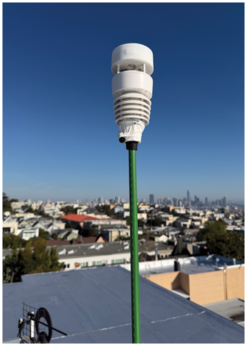
The Wittboy WS90 weather sensor (Figure 1) is designed for outdoor use, ideally to be installed on the roof of a house, so that rain can fall on it and the wind blow through it without interference. It does not need an external power supply, because it relies on two AA batteries as a buffer and simultaneously charges an internal super capacitor via an integrated solar panel. The sensor has no moving parts. It uses piezoelectric elements to measure rain, and ultrasonic sensors to measure wind direction and speed. The device can optionally be heated in winter to help melt away any snow cover that might otherwise be blocking the sensors. The downside is that the heater then requires a power supply, but luckily in never snows in San Francisco, where I live.
[...]
Buy this article as PDF
(incl. VAT)
Buy Linux Magazine
Subscribe to our Linux Newsletters
Find Linux and Open Source Jobs
Subscribe to our ADMIN Newsletters
Support Our Work
Linux Magazine content is made possible with support from readers like you. Please consider contributing when you’ve found an article to be beneficial.

News
-
Linux Mint 27 Set for a Christmas Release
The developers behind Linux Mint have announced a Christmas release, and it looks like Santa's sack will be brimming with features.
-
Is Linus Torvalds Vibe Coding?
The creator of Linux has added AI into his process for Linux kernel development, and it's more than just for debugging.
-
openKylin 3.0 Released with Expanded AI Integration
The latest release features a pre-installed AI agent to help perform tasks.
-
DigitalOcean Ends Open Source Credits Program
In a change that has surprised many open source developers, DigitalOcean has decided to sunset its Open Source Credits Program.
-
Office 365 Available for Testing on Linux via Bottles
Linux users can now test the official Office 365, thanks to Mirko Brombin's work on Bottles.
-
Dutch Government Turns to Open Source for Digital Sovereignty
Following in the footsteps of other European countries, the Netherlands is looking to increase its sovereign digital infrastructure with open source software.
-
Linux May Soon Work on Snapdragon X2-Based PCs
If you're thinking about buying a Snapdragon X2-based desktop or laptop, Linux may soon be an option.
-
KDE for People Initiative Calls for AI Ban in Plasma
A new community of KDE wants the project to adopt a strict no-AI policy for KDE Plasma.
-
KDE Sets Ambitious Goals for 2026 and Beyond
KDE Connect reveals the goals for the Linux desktop darling, with one of those goals long overdue.
-
It’s Time to Test Fedora 45 Beta
Fedora 45 beta has been released with updated Gnome, KDE Plasma, and kernel.