


An AI Terminal Assistant
Advanced Integration with MCP
So far, I have shown how to use a very basic mode of Gemini that relies on Gemini's training dataset. To extend Gemini CLI's functionality to the next level, you can use a Model Context Protocol (MCP) server. MCP is an open source protocol that serves as a bridge between Gemini and external services and tools (see Figure 9), allowing you to use data outside Gemini to supercharge your projects. In a nutshell, you can think of MCP as a plugin that normally scales the power of a native application.
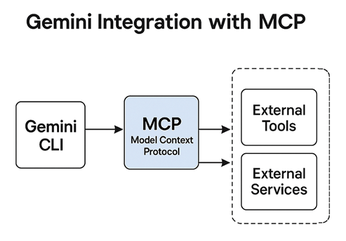
There are many MCP servers available, each with a specific purpose. I recommend starting with a basic "Hello World!" MCP server, such as the one offered by Google Developer Codelabs [5]. Try the example and see for yourself how an MCP server is configured.
Conclusion
After spending some time with Gemini CLI, you'll find yourself reaching for this open source tool almost every day. It will help you understand code logic quickly and identify issues you might normally overlook. In addition, it's also your writing assistant: It writes drafts, summarizes, and comments with ease.
If you engage heavily with the Linux terminal, Gemini CLI is a go-to choice for your daily workflow. It's like having a coding mentor inside the terminal, ready to handle everything from debugging to documentation.
Infos
- Gemini CLI: https://github.com/google-gemini/gemini-cli
- Node.js: https://nodejs.org/
- Gemini API keys: https://aistudio.google.com/app/apikey
- Vertex AI: https://docs.cloud.google.com/vertex-ai/generative-ai/docs
- Hands-on Gemini CLI lab: https://codelabs.developers.google.com/gemini-cli-hands-on#0
The Author

Ali Imran Nagori is a technical writer and Linux enthusiast who loves to write about Linux system administration and related technologies. You can connect with him on LinkedIn https://www.linkedin.com/in/ali-imran-nagori/.
« Previous 1 2 3
Buy this article as PDF
(incl. VAT)
Buy Linux Magazine
Subscribe to our Linux Newsletters
Find Linux and Open Source Jobs
Subscribe to our ADMIN Newsletters
Support Our Work
Linux Magazine content is made possible with support from readers like you. Please consider contributing when you’ve found an article to be beneficial.

News
-
Ubuntu Core 26 Offers Game-Changing Enterprise Features
Ubuntu Core 26 could be a game-changer for organizations looking for increased security and reliability.
-
AI Flooding the Linux Kernel Security Mailing List
AI is giving Linus Torvalds a headache, but not in the way you might think.
-
Top Priorities for Open Source Pros Seeking a New Job
Professional fulfillment tops the list, according to LPI report.
-
Container-Based Fedora Hummingbird Designed for Agent-First Builders
Fedora Hummingbird brings the same approach to the host OS as it does to containers to level up security.
-
Linux kernel Developers Considering a Kill Switch
With the rise of Linux vulnerabilities, the kernel developers are now considering adding a component that could help temporarily mitigate against them… in the form of a kill switch.
-
Fedora 44 Now Gaming Ready
The latest version of Fedora has been released with gaming support.
-
Manjaro 26.1 Preview Unveils New Features
The latest Manjaro 26.1 preview has been released with new desktop versions, a new kernel, and more.
-
Microsoft Issues Warning About Linux Vulnerability
The company behind Windows has released information about a flaw that affects millions of Linux systems.
-
Is AI Coming to Your Ubuntu Desktop?
According to the VP of Engineering at Canonical, AI could soon be added to the Ubuntu desktop distribution.
-
Framework Laptop 13 Pro Competes with the Best
Framework has released what might be considered the MacBook of Linux devices.