


Zsh and two Go programs help with typing

Programming Snapshot – Zsh and Go

© Photo by Klim Musalimov on Unsplash
When typing in the shell, Mike Schilli would like a function that offers recently modified files in a terminal user interface and builds them into his commands. The Z shell and two Go programs do the trick.
How many times have you typed a command in the shell (e.g., cp) and wanted to use a file that is lying around somewhere as a parameter (e.g., a screenshot you recently saved in the Desktop/ directory)? Now, you could type ~/Desktop/ and try to find the latest file there using shell completion, but it's even easier using the file grabbers presented in this issue. While you're still typing, a character-oriented user interface (terminal user interface or TUI) pops up in response to a hotkey. It contains a list from which shell enthusiasts can select a file path without taking their fingers off the keyboard in order to seamlessly return to the now completed command line.
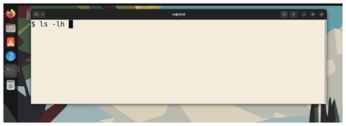
In Figure 1, the user types ls -lh and then wants to attach a file from the Desktop/ or Downloads/ folders as an argument. A short key press of Ctrl+R pops up the TUI shown in Figure 2. The user can now select one of the files on display using the cursor keys or the Vim commands (J for down; K for up). After pressing the Enter key, the shell transfers the file to the command line at the current cursor position as shown in Figure 3. The user can now continue typing, search for other files, or fire off the command by pressing Enter.
[...]
Buy this article as PDF
(incl. VAT)
Buy Linux Magazine


US / Canada
UK / Australia
Subscribe to our Linux Newsletters
Find Linux and Open Source Jobs
Subscribe to our ADMIN Newsletters
Support Our Work
Linux Magazine content is made possible with support from readers like you. Please consider contributing when you’ve found an article to be beneficial.

News
-
Parrot OS Switches to KDE Plasma Desktop
Yet another distro is making the move to the KDE Plasma desktop.
-
TUXEDO Announces Gemini 17
TUXEDO Computers has released the fourth generation of its Gemini laptop with plenty of updates.
-
Two New Distros Adopt Enlightenment
MX Moksha and AV Linux 25 join ranks with Bodhi Linux and embrace the Enlightenment desktop.
-
Solus Linux 4.8 Removes Python 2
Solus Linux 4.8 has been released with the latest Linux kernel, updated desktops, and a key removal.
-
Zorin OS 18 Hits over a Million Downloads
If you doubt Linux isn't gaining popularity, you only have to look at Zorin OS's download numbers.
-
TUXEDO Computers Scraps Snapdragon X1E-Based Laptop
Due to issues with a Snapdragon CPU, TUXEDO Computers has cancelled its plans to release a laptop based on this elite hardware.
-
Debian Unleashes Debian Libre Live
Debian Libre Live keeps your machine free of proprietary software.
-
Valve Announces Pending Release of Steam Machine
Shout it to the heavens: Steam Machine, powered by Linux, is set to arrive in 2026.
-
Happy Birthday, ADMIN Magazine!
ADMIN is celebrating its 15th anniversary with issue #90.
-
Another Linux Malware Discovered
Russian hackers use Hyper-V to hide malware within Linux virtual machines.