


Making art in the terminal window
One Row, Two Pixels: The Double-Pixeling Technique
The resolution of a terminal is limited by the font – a single character cell is taller than it is wide, and for complex images, this becomes a bottleneck, unless you like vertically stretched low-res digital art. But with a small trick, you can double the apparent vertical resolution without increasing the grid size.
The trick relies on Unicode's half-block characters "upper half block" (U2580) and "lower half block" (U2584).
Each occupies the full width of the cell but only half its height. By carefully assigning the foreground color to one and the background color to another, a single character cell can represent two distinct color pixels, one above the other.
For example take the following Bash command:
printf "\033[38;2;255;0;0m\033\
  [48;2;0;0;255m\u2580\033[0m\n";
which paints red on top and blue on the bottom, effectively compressing two vertical pixels into one text row.
Visually, the effect doubles the Y-resolution of your image – a 100x50 character terminal can now display a 100x100 pixel field. This technique is known as double-pixeling, and it's the base of the terminal-based image rendering system described in this article, allowing scenes to look surprisingly detailed (especially if you increase the zoom level of your terminal to inhuman sizes).
In practice, when you render an image, you:
- Read the RGB values of two vertically adjacent pixels.
- Set the terminal's foreground color to the top pixel's color.
- Set the background color to the bottom pixel's color.
- Print the upper half-block Unicode character.
Each new line of text thus represents two lines of the source image – one in the foreground, and one in the background – perfectly doubling vertical resolution while halving the character count.
Painting in RGB: The PNG Loader
Now that you have convinced your terminal to simulate high resolution, you can feed it high-quality color data, which has some meaning too. The simplest way to convince it that it is doing something useful is to load a PNG image, scale it to fit the terminal dimensions, and display it using the double-pixeling technique described previously.
I will use the very handy, single-header-only library stb_image.h [3] to load a PNG file. The source for it can be found in clipngview.cpp, which again is quite long, so I just present the interesting parts of it. The first interesting part is the process of how to get the terminal's size (Listing 3).
Listing 3
Retrieving the Terminal Size
static void get_terminal_size(int &cols,int &rows){
    struct winsize w;
    if(ioctl(STDOUT_FILENO, TIOCGWINSZ, &w) == -1){
        cols = 80; rows = 24;
    } else {
        cols = w.ws_col; rows = w.ws_row;
    }
}
Listing 3 appeals to an ioctl call called TIOCGWINSZ to query the size of a terminal window – specifically, the number of rows and columns (in characters) and the pixel dimensions (if available). The acronym TIOCGWINSZ stands for Terminal Input/Output Control Get WINdow SiZe.
When you call ioctl() with this request on a terminal file descriptor (like STDOUT_FILENO), it fills a struct winsize with the terminal's current dimensions, just as you can see in the code sample.
Back to the PNG loading code: Instead of just using the "nearest-neighbor" algorithm for each terminal character (which would look quite blocky even in a terminal), the program uses bilinear filtering to smoothly scale the source image to fit the terminal dimensions.
The magic happens entirely within the sample_bilinear function, which is way too long to present here, but again, I encourage you to browse code on the project's GitHub site [1].
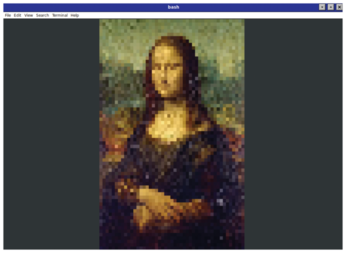
To draw, I use the draw_pixels_to_terminal function, which calculates the scaling factor between the image and the target terminal size, then loops through each terminal character block, and does an inverse mapping to find the corresponding coordinates in the source image. Certainly, if you increase the zoom level of the terminal, the image quality is better. However, if you look at this image from two meters distance, you can instantly recognize the most mysterious smile on the planet, showcased in Figure 4.
Animation in the Terminal
After exploring the static fundamentals of color and form in the terminal, it is natural to ask: How can these shapes come alive? Animation, at its core, is simply the rapid sequence of changing frames, each slightly different from the last, creating the illusion of motion.
The first consideration in any animation is timing. Each frame must be displayed for a consistent duration, typically between 30 and 60 milliseconds, to achieve a smooth experience. Too slow, and the motion feels choppy; too fast, and the eye cannot follow the patterns.
A common problem in terminal animation is flickering, caused by updating characters directly on the visible screen. To mitigate this, I will introduce double buffering. In this approach, the program maintains two separate buffers: one representing the current display and one for the next frame. All computations and drawing operations are performed in the offscreen buffer. Once the frame is ready, the buffers are swapped, and the new frame is written to the terminal in a single pass. This technique ensures that intermediate calculations are never visible, providing smooth, flicker-free motion even on relatively slow terminals.
With the mechanics of animation established, I can begin to introduce controlled randomness. Randomness need not be chaotic; when applied thoughtfully, it can imbue a simulation with the appearance of life. For example, a small Gaussian spread can determine how quickly certain colors fade or how individual elements drift across the terminal, producing a natural, plasma-like motion.
Buy this article as PDF
(incl. VAT)
Buy Linux Magazine
Subscribe to our Linux Newsletters
Find Linux and Open Source Jobs
Subscribe to our ADMIN Newsletters
Support Our Work
Linux Magazine content is made possible with support from readers like you. Please consider contributing when you’ve found an article to be beneficial.

News
-
AI Helped Develop a Linux Exploit
A use-after-free race exploit was discovered and exploited on CentOS Stream 9.
-
Yet Another Linux Kernel Vulnerability Discovered
Affecting millions of systems, a kernel flaw discovered by Qualys could allow users to gain root privileges.
-
Ubuntu 26.10 to Include Ubuntu Certified Hardware Check
If you've ever wondered if your laptop or PC is officially certified to run Ubuntu, that curiosity will soon be met.
-
Substantial Update to IPFire Now Available
The lastest version of IPFire features a fundamental change to how the system handles DNS.
-
Gnome Working on Test Center App to Make Testing Easier
It's now possible to test experimental features on the Gnome desktop without worrying that you'll break things.
-
New Vulnerability Discovered in Linux Kernel
Hiding out for nearly 15 years, the Ghostlock vulnerability allows a standard logged-in user to gain root privileges.
-
New Linux Flaw Lets Attackers Escape VMs
A 16-year-old vulnerability allows an attacker to escape a virtual machine, gain access to the host, and execute malicious code.
-
Hannah Montana Linux Is Back!
Developer Noah Cagle decided the world needed the once obscure but beloved Linux distribution and gave it a decidedly pink refresh.
-
System76 Refreshes the Lemur Laptop
If you're looking for a laptop with tons of power and battery, look no further than the latest iteration of the System76 Lemur Pro.
-
More than 43 Million Lines of Code in Linux Kernel 7.2
Using the cloc utility, Michael Larabel of Phoronix discovered that Linux kernel 7.2 has over 43 million lines of code.